> ## Documentation Index
> Fetch the complete documentation index at: https://docs.geekai.co/llms.txt
> Use this file to discover all available pages before exploring further.
# 语音对话
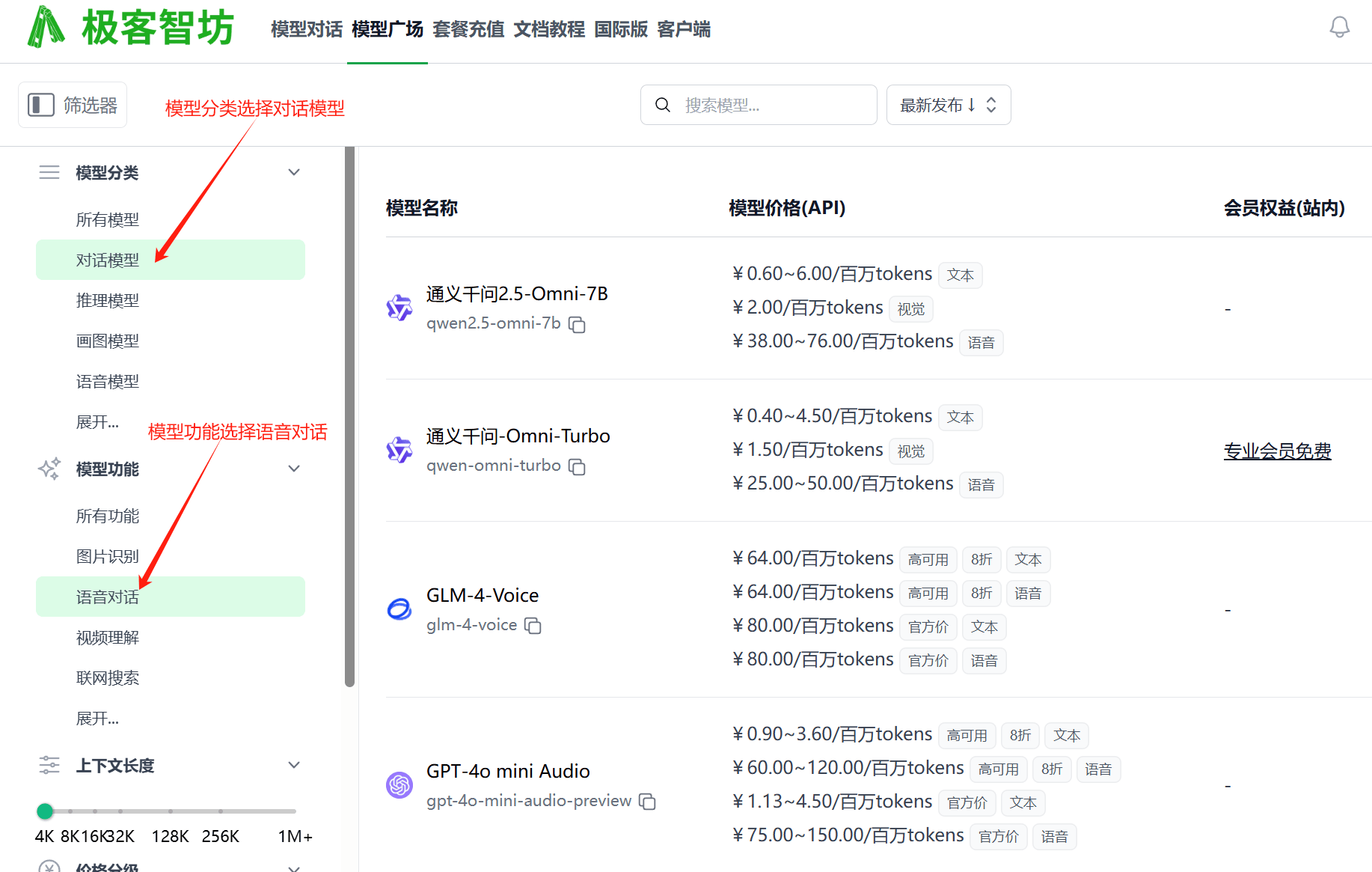
极客智坊支持实时语音对话功能,支持在对话请求中将模型设置为支持语音对话的模型即可,你可以在[模型广场](https://geekai.co/models)筛选支持实时语音对话的模型:
### OpenAI
以下是 OpenAI 平台实时语音对话示例代码:
```bash curl theme={null}
curl "https://geekai.co/api/v1/chat/completions" \
-H "Content-Type: application/json" \
-H "Authorization: Bearer $GEEKAI_API_KEY" \
-d '{
"model": "gpt-4o-mini-audio-preview",
"modalities": ["text", "audio"],
"audio": { "voice": "alloy", "format": "wav" },
"messages": [
{
"role": "user",
"content": [
{ "type": "text", "text": "What is in this recording?" },
{
"type": "input_audio",
"input_audio": {
"data": "",
"format": "wav"
}
}
]
}
]
}'
```
```bash python theme={null}
import base64
import requests
from openai import OpenAI
client = OpenAI(api_key="$GEEKAI_API_KEY", base_url="https://geekai.co/api/v1")
completion = client.chat.completions.create(
model="gpt-4o-mini-audio-preview",
modalities=["text", "audio"],
audio={"voice": "alloy", "format": "wav"},
messages=[
{
"role": "user",
"content": [
{
"type": "text",
"text": "What is in this recording?"
},
{
"type": "input_audio",
"input_audio": {
"data": "",
"format": "wav"
}
}
]
},
]
)
print(completion.choices[0])
wav_bytes = base64.b64decode(completion.choices[0].message.audio.data)
with open("dog.wav", "wb") as f:
f.write(wav_bytes)
```
```bash javascript theme={null}
import OpenAI from "openai";
const openai = new OpenAI({
baseURL: 'https://geekai.co/api/v1',
apiKey: '$GEEKAI_API_KEY'
});
const response = await openai.chat.completions.create({
model: "gpt-4o-mini-audio-preview",
modalities: ["text", "audio"],
audio: { voice: "alloy", format: "wav" },
messages: [
{
role: "user",
content: [
{ type: "text", text: "What is in this recording?" },
{ type: "input_audio", input_audio: { data: "url or base64 bytes here", format: "wav" }}
]
}
],
store: true,
});
// Inspect returned data
console.log(response.choices[0]);
// Write audio data to a file
writeFileSync(
"dog.wav",
Buffer.from(response.choices[0].message.audio.data, 'base64'),
{ encoding: "utf-8" }
);
```
`modalities` 传入 `text`、`audio` 表示返回文本、语音输出,如果需要文本输出传入 `text` 即可。`audio` 用于设置语音输出的音色和格式,对于 OpenAI 平台而言,具体设置和[文本转语音](https://docs.geekai.co/cn/docs/audio/tts)的参数一致。
### 国内平台
OpenAI 输出语音音色为外国人音色(如果输出设置为文本就无所谓),对中文场景不友好,此时你也可以选择国内实时语音对话模型,如智谱清言和通义千问,智谱清言无需 `modalities` 和 `audio` 参数配置,更简单明了,通义千问的 `modalities` 配置和 OpenAI 一致,音色(`audio` 的 `voice` 字段)上支持中文音色:
* Cherry(不支持开源模型)
* Serena(不支持开源模型)
* Ethan
* Chelsie
音频输出格式(`audio` 的 `format` 字段)仅支持 `wav`。
以下是通义千问语音对话示例:
```bash curl theme={null}
curl "https://geekai.co/api/v1/chat/completions" \
-H "Content-Type: application/json" \
-H "Authorization: Bearer $GEEKAI_API_KEY" \
-d '{
"model": "qwen-omni-turbo",
"modalities": ["text", "audio"],
"audio": { "voice": "Cherry", "format": "wav" },
"messages": [
{
"role": "user",
"content": [
{ "type": "text", "text": "音频中包含什么内容?" },
{
"type": "input_audio",
"input_audio": {
"data": "",
"format": "wav"
}
}
]
}
]
}'
```