> ## Documentation Index
> Fetch the complete documentation index at: https://docs.geekai.co/llms.txt
> Use this file to discover all available pages before exploring further.
# 推理模式
### DeepSeek
DeepSeek R1 系列及衍生蒸馏模型均为推理模型,且默认开启:
```bash curl theme={null}
curl https://geekai.co/api/v1/chat/completions \
-H "Content-Type: application/json" \
-H "Authorization: Bearer $GEEKAI_API_KEY" \
-d '{
"model": "deepseek-reasoner",
"messages": [
{"role": "user", "content": "你好"}
],
"stream": false
}'
```
```bash python theme={null}
# 先安装 OpenAI SDK: `pip3 install openai`
from openai import OpenAI
client = OpenAI(api_key="$GEEKAI_API_KEY", base_url="https://geekai.co/api/v1")
response = client.chat.completions.create(
model="deepseek-reasoner",
messages=[
{"role": "user", "content": "你好"},
],
stream=False
)
print(response.choices[0].message.content)
print(response.choices[0].message.reasoning_content)
```
```bash javascript theme={null}
// 先安装 OpenAI SDK: `npm install openai`
import OpenAI from "openai";
const openai = new OpenAI({
baseURL: 'https://geekai.co/api/v1',
apiKey: '$GEEKAI_API_KEY'
});
async function main() {
const completion = await openai.chat.completions.create({
messages: [{role: "user", content: "你好"}],
model: "deepseek-reasoner",
});
console.log(completion.choices[0].message.content);
console.log(completion.choices[0].message.reasoning_content);
}
main();
```
```bash go theme={null}
package main
import (
"bytes"
"encoding/json"
"fmt"
"io"
"net/http"
)
func main() {
requestBody := map[string]interface{}{
"model": "deepseek-reasoner",
"messages": []interface{}{
map[string]interface{}{
"role": "user",
"content": "你好",
},
}
}
jsonData, err := json.Marshal(requestBody)
if err != nil {
panic(err)
}
client := &http.Client{}
req, err := http.NewRequest("POST", "https://geekai.co/api/v1/chat/completions", bytes.NewBuffer(jsonData))
if err != nil {
panic(err)
}
req.Header.Set("Authorization", "Bearer $GEEKAI_API_KEY")
req.Header.Set("Content-Type", "application/json")
resp, err := client.Do(req)
if err != nil {
panic(err)
}
defer resp.Body.Close()
body, err := io.ReadAll(resp.Body)
if err != nil {
panic(err)
}
fmt.Println(string(body))
}
```
对于推理模型,可以从 AI 响应内容中通过 `reasoning_content` 字段读取推理的思考链内容并显示:
```json theme={null}
{
"id": "02174473184980118a5d045ccc6bc157c3dd771c8dafe42a7c3c9",
"created": 1744731857,
"choices": [
{
"index": 0,
"message": {
"role": "assistant",
"content": "\n\n你好!很高兴见到你,有什么我可以帮忙的吗?无论是问题、建议还是闲聊,我都在这里为你服务。😊",
"reasoning_content": "好,用户发来了“你好”,这是常见的中文问候。我需要用中文回应,保持友好和自然。首先应该回复问候,比如“你好!有什么我可以帮助你的吗?”然后可以加上一句开放式的提问,鼓励用户进一步说明需求。注意不要用太正式的语气,保持亲切。同时检查有没有拼写错误,确保回答正确无误。另外,可能需要考虑用户接下来可能的问题,提前准备好相关的信息。比如,用户可能会问天气、新闻或者需要建议等。但在这个阶段,保持简洁和友好最重要。不需要太长的回复,避免让用户感到信息过载。确认回复符合公司的指导方针,没有涉及敏感内容。然后发送回复即可。\n"
},
"finish_reason": "stop"
}
],
"model": "deepseek-reasoner",
"object": "chat.completion",
"usage": {
"prompt_tokens": 6,
"completion_tokens": 169,
"total_tokens": 175,
"completion_tokens_details": {
"reasoning_tokens": 142
}
}
}
```
推理模型通常不支持系统提示以及温度参数,因此在进行 API 调用的时候不要设置这两个参数。对于 DeepSeek 推理模型,还不支持函数调用及JSON输出功能,以及不支持 `temperature`、`top_p`、`presence_penalty`、`frequency_penalty`、`logprobs`、`top_logprobs` 参数。
### OpenAI
OpenAI 旗下的 o 系列和 GPT-5 系列模型均为推理模型,默认开启,且支持通过 `thinking.reasoning_effort` 设置推理的努力程度,可选值有 `none`(GPT-5.1 开始支持)、`minimal`(GPT-5 开始支持)、 `low`、`medium`、`high`,默认为 `medium`(GPT 5.1 默认 `none`,即不开启推理):
```bash curl theme={null}
curl --location --request POST 'https://geekai.co/api/v1/chat/completions' \
--header 'Authorization: Bearer $GEEKAI_API_KEY' \
--header 'Content-Type: application/json' \
--data-raw '{
"model": "gpt-5",
"messages": [
{
"role": "user",
"content": "你好"
}
],
"thinking": {
"reasoning_effort": "high"
},
"stream": true
}'
```
```bash python theme={null}
# 先安装 OpenAI SDK: `pip3 install openai`
from openai import OpenAI
client = OpenAI(api_key="$GEEKAI_API_KEY", base_url="https://geekai.co/api/v1")
response = client.chat.completions.create(
model="gpt-5",
messages=[
{"role": "user", "content": "你好"},
],
stream=False
)
print(response.choices[0].message.content)
print(response.choices[0].message.reasoning_content)
```
```bash javascript theme={null}
// 先安装 OpenAI SDK: `npm install openai`
import OpenAI from "openai";
const openai = new OpenAI({
baseURL: 'https://geekai.co/api/v1',
apiKey: '$GEEKAI_API_KEY'
});
async function main() {
const completion = await openai.chat.completions.create({
messages: [{role: "user", content: "你好"}],
model: "gpt-5",
});
console.log(completion.choices[0].message.content);
console.log(completion.choices[0].message.reasoning_content);
}
main();
```
```bash go theme={null}
package main
import (
"bytes"
"encoding/json"
"fmt"
"io"
"net/http"
)
func main() {
requestBody := map[string]interface{}{
"model": "gpt-5",
"messages": []interface{}{
map[string]interface{}{
"role": "user",
"content": "你好",
},
}
}
jsonData, err := json.Marshal(requestBody)
if err != nil {
panic(err)
}
client := &http.Client{}
req, err := http.NewRequest("POST", "https://geekai.co/api/v1/chat/completions", bytes.NewBuffer(jsonData))
if err != nil {
panic(err)
}
req.Header.Set("Authorization", "Bearer $GEEKAI_API_KEY")
req.Header.Set("Content-Type", "application/json")
resp, err := client.Do(req)
if err != nil {
panic(err)
}
defer resp.Body.Close()
body, err := io.ReadAll(resp.Body)
if err != nil {
panic(err)
}
fmt.Println(string(body))
}
```
OpenAI 推理的思考链内容默认通过 `` 和 `` 标签包裹,并且和 AI 响应内容混在一起,这在流式响应中很难提取,为了降低开发者兼容成本,极客智坊所有推理模型思考链内容均兼容 DeepSeek 推理模型,都是从 AI 响应内容的 `reasoning_content` 字段获取(如果没有思考链,则对应字段值为空)。
如果使用的是 `o3-mini-high`、`o4-mini-high` 推理模型,则默认努力程度为 `high`,不需要额外单独设置。
关于 `thinking` 配置的更多细节,请参考 [API 手册说明](https://docs.geekai.co/cn/api/chat/completions)。
### Claude
Claude 3.7 及更高版本模型(即 Claude 3.7、Claude 4.0、Claude 4.5 系列模型)才支持推理模式,支持推理模式的 Cluade 模型都是混合推理模型,需要通过设置 `thinking` 配置项开启,以及配置用于思考的 tokens 预算:
```bash curl theme={null}
curl --location --request POST 'https://geekai.co/api/v1/chat/completions' \
--header 'Authorization: Bearer $GEEKAI_API_KEY"' \
--header 'Content-Type: application/json' \
--data-raw '{
"model": "claude-sonnet-4-5",
"messages": [
{
"role": "user",
"content": "你好"
}
],
"thinking": {
"type":"enabled",
"budget_tokens": 10000
},
"max_tokens": 16000,
"stream": true
}'
```
```bash python theme={null}
# 先安装 OpenAI SDK: `pip3 install openai`
from openai import OpenAI
client = OpenAI(api_key="$GEEKAI_API_KEY", base_url="https://geekai.co/api/v1")
response = client.chat.completions.create(
model="claude-sonnet-4-5",
messages=[
{"role": "user", "content": "你好"},
],
stream=False
)
print(response.choices[0].message.content)
print(response.choices[0].message.reasoning_content)
```
```bash javascript theme={null}
// 先安装 OpenAI SDK: `npm install openai`
import OpenAI from "openai";
const openai = new OpenAI({
baseURL: 'https://geekai.co/api/v1',
apiKey: '$GEEKAI_API_KEY'
});
async function main() {
const completion = await openai.chat.completions.create({
messages: [{role: "user", content: "你好"}],
model: "claude-sonnet-4-5",
});
console.log(completion.choices[0].message.content);
console.log(completion.choices[0].message.reasoning_content);
}
main();
```
```bash go theme={null}
package main
import (
"bytes"
"encoding/json"
"fmt"
"io"
"net/http"
)
func main() {
requestBody := map[string]interface{}{
"model": "claude-sonnet-4-5",
"messages": []interface{}{
map[string]interface{}{
"role": "user",
"content": "你好",
},
}
}
jsonData, err := json.Marshal(requestBody)
if err != nil {
panic(err)
}
client := &http.Client{}
req, err := http.NewRequest("POST", "https://geekai.co/api/v1/chat/completions", bytes.NewBuffer(jsonData))
if err != nil {
panic(err)
}
req.Header.Set("Authorization", "Bearer $GEEKAI_API_KEY")
req.Header.Set("Content-Type", "application/json")
resp, err := client.Do(req)
if err != nil {
panic(err)
}
defer resp.Body.Close()
body, err := io.ReadAll(resp.Body)
if err != nil {
panic(err)
}
fmt.Println(string(body))
}
```
如果请求设置了 `max_tokens`,则 `budget_tokens` 的值不能超过 `max_tokens` 的值。Claude 开启推理模式后不支持 `temperature`、`top_p`、`top_k` 参数设置。
Claude 推理模式思考链内容也兼容 DeepSeek 推理模型,通过 `reasoning_content` 字段获取。
如果使用的是带 `-thinking` 后缀的模型ID,则默认已开启推理模式,且 `budget_tokens` 值为 24000,可以 `thinking` 参数。
如果你想要启用 Claude Sonnet 3.7 最大支持 128K 输出的实验特性,可以通过将 `thinking.reasoning_effort` 设置为 `high` 实现(仅 3.7 版本支持生效,其他版本会忽略该配置)。
### Gemini
Gemini 2.5 开始所有模型默认为推理模型,且默认开启,你可以通过将 `thinking.budget_tokens` 设置为 `0` 关闭推理模式(对 Gemini 2.5 Pro 无效,因为其不支持关闭推理模式),以加速 AI 回复速度,如果你想要显示思考链内容,可以将 `thinking.include_thoughts` 设置为 `true`(默认 `false` 不显示思考链),还可以通过修改 `thinking.budget_tokens` 调节用于推理的最大 tokens 数,该数值越大,思考深度越深:
```bash curl theme={null}
curl https://geekai.co/api/v1/chat/completions \
-H "Content-Type: application/json" \
-H "Authorization: Bearer $GEEKAI_API_KEY" \
-d '{
"model": "gemini-2.5-flash",
"messages": [
{"role": "user", "content": "1+1为什么等于2?"}
],
"thinking": {
"include_thoughts": true,
"budget_tokens": 30000
},
"stream": false
}'
```
```bash python theme={null}
# 先安装 OpenAI SDK: `pip3 install openai`
from openai import OpenAI
client = OpenAI(api_key="$GEEKAI_API_KEY", base_url="https://geekai.co/api/v1")
response = client.chat.completions.create(
model="gemini-2.5-flash",
messages=[
{"role": "user", "content": "1+1为什么等于2?"},
],
thinking={"include_thoughts": True, "budget_tokens": 30000},
stream=False
)
print(response.choices[0].message.content)
```
```bash javascript theme={null}
// 先安装 OpenAI SDK: `npm install openai`
import OpenAI from "openai";
const openai = new OpenAI({
baseURL: 'https://geekai.co/api/v1',
apiKey: '$GEEKAI_API_KEY'
});
async function main() {
const completion = await openai.chat.completions.create({
messages: [{role: "user", content: "1+1为什么等于2?"}],
thinking: { include_thoughts:true, budget_tokens: 30000 },
model: "gemini-2.5-flash",
});
console.log(completion.choices[0].message.content);
}
main();
```
```bash go theme={null}
package main
import (
"bytes"
"encoding/json"
"fmt"
"io"
"net/http"
)
func main() {
requestBody := map[string]interface{}{
"model": "gemini-2.5-flash",
"messages": []interface{}{
map[string]interface{}{
"role": "user",
"content": "1+1为什么等于2?",
},
},
"thinking": map[string]interface{}{
"include_thoughts": true,
"budget_tokens": 30000,
},
"stream": false,
}
jsonData, err := json.Marshal(requestBody)
if err != nil {
panic(err)
}
client := &http.Client{}
req, err := http.NewRequest("POST", "https://geekai.co/api/v1/chat/completions", bytes.NewBuffer(jsonData))
if err != nil {
panic(err)
}
req.Header.Set("Authorization", "Bearer $GEEKAI_API_KEY")
req.Header.Set("Content-Type", "application/json")
resp, err := client.Do(req)
if err != nil {
panic(err)
}
defer resp.Body.Close()
body, err := io.ReadAll(resp.Body)
if err != nil {
panic(err)
}
fmt.Println(string(body))
}
```
Gemini 推理模式思考链内容也兼容 DeepSeek 推理模型,通过 `reasoning_content` 字段获取。
仅 Gemini 2.5 系列模型支持 `thinking.budget_tokens` 参数,对于 Gemini 2.5 Pro 该参数值范围是 128-32768,如果未设置该参数,模型会自行决定,对于 Gemini 2.5 Flash,该参数值范围是 0-24576,0 表示关闭推理功能。
如果使用的是名称带 `:no-thinking` 后缀的模型,则默认已关闭推理模式,且 `budget_tokens` 值为 0,可以不传递 `thinking` 参数。
### Grok 4
Grok 4 是 xAI 最新发布的、支持图片输入的视觉推理模型,默认开启推理模式,且目前不支持关闭,调用方式和 Grok 3 一致:
```bash curl theme={null}
curl https://geekai.co/api/v1/chat/completions \
-H "Content-Type: application/json" \
-H "Authorization: Bearer $GEEKAI_API_KEY" \
-d '{
"model": "grok-4",
"messages": [
{
"role": "user",
"content": [
{
"type": "text",
"text": "请帮我解答这个数学题,并给出详细过程和答案"
},
{
"type": "image_url",
"image_url": {
"url" : "https://static.geekai.co/storage/2025/07/11/math-question.jpeg"
}
}
]
}
]
}'
```
```bash python theme={null}
# 先安装 OpenAI SDK: `pip3 install openai`
from openai import OpenAI
client = OpenAI(api_key="$GEEKAI_API_KEY", base_url="https://geekai.co/api/v1")
response = client.chat.completions.create(
model="grok-4",
messages=[
{
"role": "user",
"content": [
{
"type": "text",
"text": "请帮我解答这个数学题,并给出详细过程和答案"
},
{
"type": "image_url",
"image_url": {
"url" : "https://static.geekai.co/storage/2025/07/11/math-question.jpeg"
}
}
]
}
],
stream=False
)
print(response.choices[0].message.content)
```
```bash javascript theme={null}
// 先安装 OpenAI SDK: `npm install openai`
import OpenAI from "openai";
const openai = new OpenAI({
baseURL: 'https://geekai.co/api/v1',
apiKey: '$GEEKAI_API_KEY'
});
async function main() {
const completion = await openai.chat.completions.create({
messages: [
{
"role": "user",
"content": [
{
"type": "text",
"text": "请帮我解答这个数学题,并给出详细过程和答案"
},
{
"type": "image_url",
"image_url": {
"url" : "https://static.geekai.co/storage/2025/07/11/math-question.jpeg"
}
}
]
}
],
model: "grok-4",
});
console.log(completion.choices[0].message.content);
}
main();
```
```bash go theme={null}
package main
import (
"bytes"
"encoding/json"
"fmt"
"io"
"net/http"
)
func main() {
requestBody := map[string]interface{}{
"model": "grok-4",
"messages": []interface{}{
map[string]interface{}{
"role": "user",
"content": []interface{}{
map[string]interface{}{
"type": "text",
"text": "请帮我解答这个数学题,并给出详细过程和答案",
},
map[string]interface{}{
"type": "image_url",
"image_url": map[string]interface{}{
"url": "https://static.geekai.co/storage/2025/07/11/math-question.jpeg",
},
},
},
},
},
}
jsonData, err := json.Marshal(requestBody)
if err != nil {
panic(err)
}
client := &http.Client{}
req, err := http.NewRequest("POST", "https://geekai.co/api/v1/chat/completions", bytes.NewBuffer(jsonData))
if err != nil {
panic(err)
}
req.Header.Set("Authorization", "Bearer $GEEKAI_API_KEY")
req.Header.Set("Content-Type", "application/json")
resp, err := client.Do(req)
if err != nil {
panic(err)
}
defer resp.Body.Close()
body, err := io.ReadAll(resp.Body)
if err != nil {
panic(err)
}
fmt.Println(string(body))
}
```
Grok 4 推理模式思考链内容也兼容 DeepSeek 推理模型,通过 `reasoning_content` 字段获取。
### Qwen3
Qwen3 系列所有模型均为推理模式和非推理模式融合模型,且支持通过 `enable_thinking` 参数切换(仅千问模型支持该参数),默认关闭:
```bash curl theme={null}
curl https://geekai.co/api/v1/chat/completions \
-H "Content-Type: application/json" \
-H "Authorization: Bearer $GEEKAI_API_KEY" \
-d '{
"model": "qwen3-max",
"messages": [
{"role": "user", "content": "1+1为什么等于2?"}
],
"stream": true,
"enable_thinking": true
}'
```
```bash python theme={null}
# 先安装网络库 `pip3 install aiohttp asyncio`
import aiohttp
import asyncio
import json
async def invoke_geekai():
headers = {
"Authorization": "Bearer $GEEKAI_API_KEY",
"Content-Type": "application/json"
}
body = {
"model": "qwen3-max",
"messages": [
{
"role": "user",
"content": "1+1为什么等于2?"
}
],
"enable_thinking": True,
"stream": True
}
async with aiohttp.ClientSession() as session:
async with session.post(
"https://geekai.co/v1/chat/completions",
headers=headers,
json=body
) as response:
async for line in response.content:
line = line.decode("utf-8").strip()
if line.startswith("data: "):
data = line[6:]
if data == "[DONE]":
break
try:
chunk = data.strip()
if chunk:
print(chunk)
except Exception as e:
print(f"Error parsing chunk: {e}")
asyncio.run(invoke_geekai())
```
```bash javascript theme={null}
const response = await fetch("https://geekai.co/v1/chat/completions", {
method: "POST",
headers: {
"Authorization": "Bearer $GEEKAI_API_KEY",
"Content-Type": "application/json"
},
body: JSON.stringify({
"model": "qwen3-max",
"messages": [
{
"role": "user",
"content": "1+1为什么等于2?"
}
],
"stream": true,
"enable_thinking": true
})
});
const data = await response.json();
console.log(data);
```
```bash go theme={null}
package main
import (
"bytes"
"encoding/json"
"fmt"
"io"
"net/http"
)
func main() {
requestBody := map[string]interface{}{
"model": "qwen3-max",
"messages": []interface{}{
map[string]interface{}{
"role": "user",
"content": "1+1为什么等于2?",
},
},
"enable_thinking": true,
"stream": true,
}
jsonData, err := json.Marshal(requestBody)
if err != nil {
panic(err)
}
client := &http.Client{}
req, err := http.NewRequest("POST", "https://geekai.co/api/v1/chat/completions", bytes.NewBuffer(jsonData))
if err != nil {
panic(err)
}
req.Header.Set("Authorization", "Bearer $GEEKAI_API_KEY")
req.Header.Set("Content-Type", "application/json")
resp, err := client.Do(req)
if err != nil {
panic(err)
}
defer resp.Body.Close()
body, err := io.ReadAll(resp.Body)
if err != nil {
panic(err)
}
fmt.Println(string(body))
}
```
需要注意的是 Qwen3 系列模型**关闭推理模式才可以使用函数调用功能**,此外 `qwen3-8b`、`qwen3-14b`、`qwen3-32b`、`qwen3-30b-a3b`、`qwen3-235b-a22b` 均支持开源免费版本,加上 `:free` 后缀即可,你可以在[模型广场](https://geekai.co/models)进行筛选和查看。
### GLM 推理模型
GLM Z1、GLM 4.5、GLM 4.6 系列及衍生蒸馏模型均为推理模型,且默认开启:
```bash curl theme={null}
curl https://geekai.co/api/v1/chat/completions \
-H "Content-Type: application/json" \
-H "Authorization: Bearer $GEEKAI_API_KEY" \
-d '{
"model": "glm-z1-flash",
"messages": [
{"role": "user", "content": "你好"}
],
"stream": false
}'
```
```bash python theme={null}
# 先安装 OpenAI SDK: `pip3 install openai`
from openai import OpenAI
client = OpenAI(api_key="$GEEKAI_API_KEY", base_url="https://geekai.co/api/v1")
response = client.chat.completions.create(
model="glm-z1-flash",
messages=[
{"role": "user", "content": "你好"},
],
stream=False
)
print(response.choices[0].message.content)
print(response.choices[0].message.reasoning_content)
```
```bash javascript theme={null}
// 先安装 OpenAI SDK: `npm install openai`
import OpenAI from "openai";
const openai = new OpenAI({
baseURL: 'https://geekai.co/api/v1',
apiKey: '$GEEKAI_API_KEY'
});
async function main() {
const completion = await openai.chat.completions.create({
messages: [{role: "user", content: "你好"}],
model: "glm-z1-flash",
});
console.log(completion.choices[0].message.content);
console.log(completion.choices[0].message.reasoning_content);
}
main();
```
```bash go theme={null}
package main
import (
"bytes"
"encoding/json"
"fmt"
"io"
"net/http"
)
func main() {
requestBody := map[string]interface{}{
"model": "glm-z1-flash",
"messages": []interface{}{
map[string]interface{}{
"role": "user",
"content": "你好",
},
}
}
jsonData, err := json.Marshal(requestBody)
if err != nil {
panic(err)
}
client := &http.Client{}
req, err := http.NewRequest("POST", "https://geekai.co/api/v1/chat/completions", bytes.NewBuffer(jsonData))
if err != nil {
panic(err)
}
req.Header.Set("Authorization", "Bearer $GEEKAI_API_KEY")
req.Header.Set("Content-Type", "application/json")
resp, err := client.Do(req)
if err != nil {
panic(err)
}
defer resp.Body.Close()
body, err := io.ReadAll(resp.Body)
if err != nil {
panic(err)
}
fmt.Println(string(body))
}
```
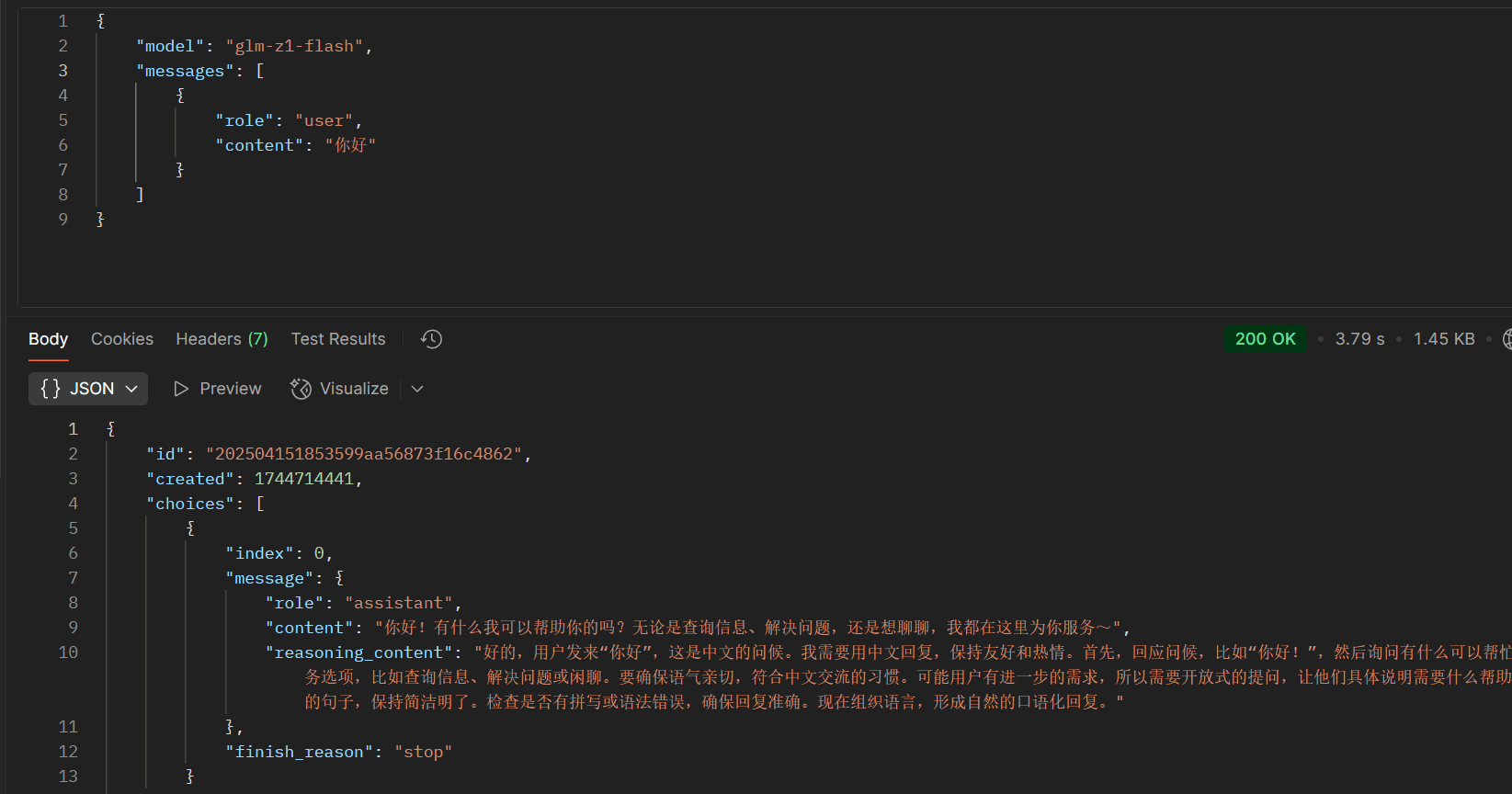
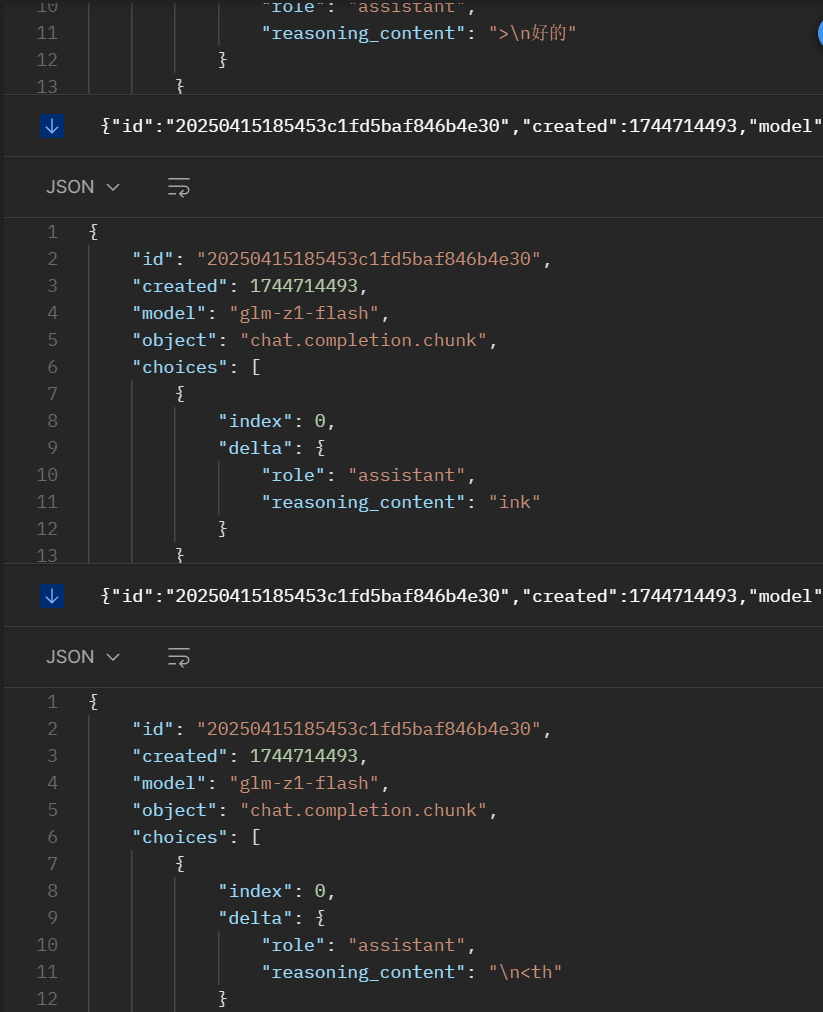
GLM Z1 系列推理模型的思考链内容默认兼容 OpenAI,也是通过 `` 和 `` 标签包裹,并且和 AI 响应内容混在一起,和 OpenAI 一样,极客智坊也使其兼容了 DeepSeek 推理模型,可以从 AI 响应内容的 `reasoning_content` 字段获取思考链内容并展示(如果没有思考链,则对应字段值为空):
* 非流式响应示例
* 流式响应示例
GLM-4.1V-Thinking 为支持图片/视频的视觉推理模型,同样默认开启推理模式,调用方式和 GLM Z1 系列一样,只不过新增对图片/视频输入的支持,且思考链内容也兼容 DeepSeek 推理模型,通过 `reasoning_content` 字段获取思考链内容并展示(如果没有思考链,则对应字段值为空):
```bash curl theme={null}
curl https://geekai.co/api/v1/chat/completions \
-H "Content-Type: application/json" \
-H "Authorization: Bearer $GEEKAI_API_KEY" \
-d '{
"model": "glm-4.1v-thinking-flash",
"messages": [
{
"role": "user",
"content": [
{
"type": "text",
"text": "请帮我解答这个数学题,并给出详细过程和答案"
},
{
"type": "image_url",
"image_url": {
"url" : "https://static.geekai.co/storage/2025/07/11/math-question.jpeg"
}
}
]
}
],
"stream": false
}'
```
新版本 GLM 4.5、GLM 4.6 系列推理模型的思考链内容也兼容 DeepSeek 推理模型,通过 `reasoning_content` 字段获取思考链内容并展示(如果没有思考链,则对应字段值为空)。
### 其他推理模型
除了上面列举的之外,还有很多其他支持推理模式的 AI 模型,如 Grok 3、Grok 4、通义 QwQ/QvQ、ERNIE X1、混元 T1 等,所有推理模型请求/响应参数兼容 DeepSeek,对于不兼容的推理模型,极客智坊底层会自动对齐。
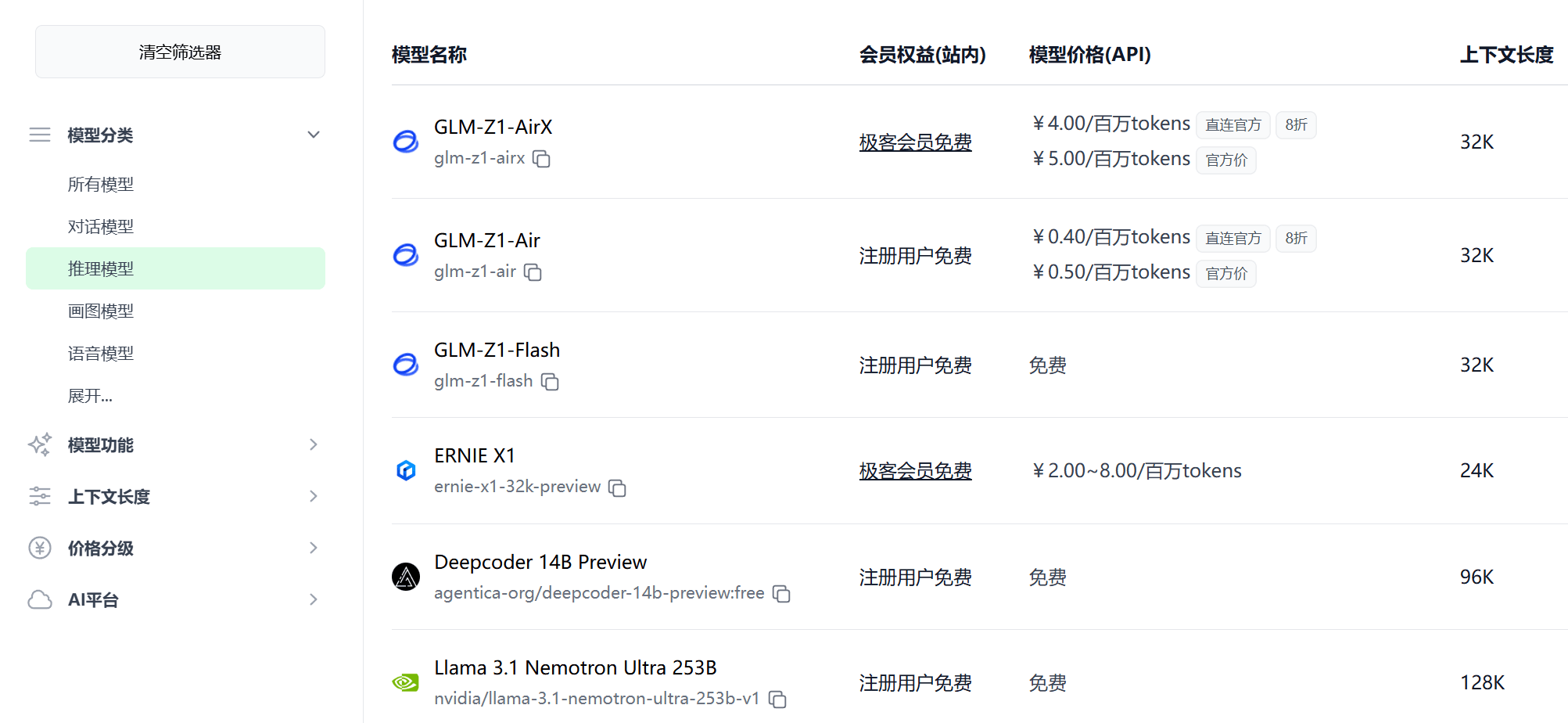
需要注意的是,只有推理模型支持推理模式,你可以在[模型广场](https://geekai.co/models)查看极客智坊支持的所有推理模型,目前极客智坊已支持40多个推理模型,特定模型还支持联网推理以及深度推理,如 DeepSeek 联网推理版、DeepSeek 深度推理版、Grok 深度推理版等:
另外,推理模型通常不支持系统提示以及温度参数,因此在进行 API 调用的时候不要设置这两个参数。