> ## Documentation Index
> Fetch the complete documentation index at: https://docs.geekai.co/llms.txt
> Use this file to discover all available pages before exploring further.
# Gemini Nano Banana 2.1
Gemini Nano Banana 2.1 是 Google 最新推出的高效图像生成与编辑模型,它是 Gemini 3.1 Flash Image(Nano Banana 2)的升级版本,价格相比 Flash 降了一半,同时在视觉质量、提示遵循性、多轮对话中的角色一致性以及文本渲染方面取得了显著提升。可以说是 Gemini 3 Pro Image(Nano Banana Pro)的更经济平替版本。
### 模型优势
* **高分辨率输出**:内置生成技术,支持 1K、2K 和 4K 画质
* **高级文本渲染**:能够生成清晰且富有风格的文本,适用于信息图表、菜单、示意图和营销资料
* **利用谷歌搜索进行信息验证**:模型能够通过谷歌搜索核实事实,并根据实时数据(如当前天气图、股票行情、最新事件)生成相应的图像,支持图像搜索
* **思考模式**:模型通过“思考”过程来分析复杂的提示,它会生成中间的“思考图像”(仅在后台可见且不计费),以便在输出最终高质量图像前不断完善构图,支持配置推理级别
* **支持多张参考图像**:您现在可以将最多 14 张参考图像组合起来,生成最终图像
### 模型参数
* 模型ID:`gemini-nano-banana-2.1`
* 模型价格:你可以在[模型详情页](https://geekai.co/models/gemini-nano-banana-2.1)查看最新价格信息
* 调用入口:`https://geekai.co/api/v1/chat/completions`
* 模型参数:参考[对话 API 手册](https://docs.geekai.co/cn/api/chat/completions)
* API认证:[获取 API KEY](https://geekai.co/user/api_keys)
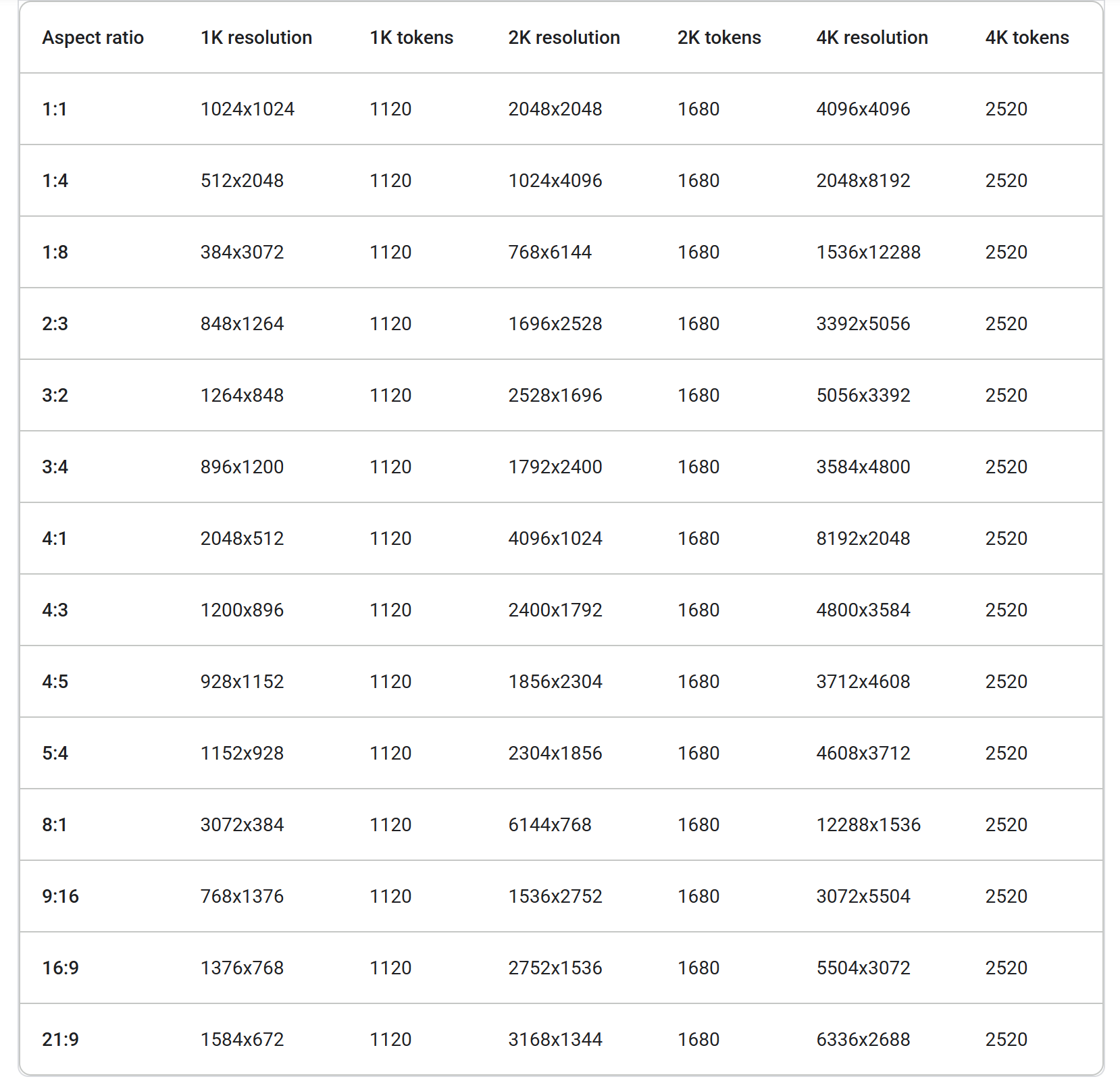
Gemini Nano Banana 2.1 支持 1、2、4K 分辨率和多个宽高比组合,不同分辨率和宽高比生成的图片尺寸如下表所示:
 ### 模型价格
Gemini Nano Banana 2.1 支持 1K、2K、4K 等多种分辨率图片生成,不同分辨率对应的价格不同,以下是价格表:
| 分辨率 | 对应尺寸 | 价格(单位:元/张) |
| - | - | - |
| 1K | 1024x1024 | 0.25 |
| 2K | 2048x2048 | 0.375 |
| 4K | 4096x4096 | 0.85 |
2K 是 1K 基准价格的 1.5 倍,4K 是 1K 基准价格的约 3.4 倍。
使用极客智坊提供的[低价代理渠道](https://docs.geekai.co/cn/docs/model_price)调用时,不同参数对应价格按照价格表x对应渠道的折扣值即可:以高可用通道为例,渠道折扣是 `0.5`,那么生成一张 `size` 为 `1K` 的图片价格是 `0.25 x 0.5 = 0.125` 元,其他参数依次类推,2K 的价格是 `0.375 x 0.5 = 0.1875` 元,4K 的价格是 `0.85 x 0.5 = 0.425` 元。
### 图像生成
下面的代码展示了如何根据描述性提示来生成一张图像:
```bash curl theme={null}
curl --location --request POST 'https://geekai.co/api/v1/chat/completions' \
--header 'Authorization: Bearer $GEEKAI_API_KEY' \
--header 'Content-Type: application/json' \
--data-raw '{
"model": "gemini-nano-banana-2.1",
"messages": [
{
"role": "user",
"content": [
{
"type": "text",
"text": "创作一个 Nano Banana 菜肴的图片,场景设在一家高档餐厅中,带有 Gemini 主题"
}
]
}
]
}'
```
### 图像编辑
以下示例展示了如何将图像与您的文本提示结合使用,以实现编辑、构图和风格转换的效果:
```bash curl theme={null}
curl --location --request POST 'https://geekai.co/api/v1/chat/completions' \
--header 'Authorization: Bearer $GEEKAI_API_KEY' \
--header 'Content-Type: application/json' \
--data-raw '{
"model": "gemini-nano-banana-2.1",
"messages": [
{
"role": "user",
"content": [
{
"type": "text",
"text": "使用提供的我的猫咪图像,请在它的头上添加一顶小的、针织的巫师帽。让它看起来坐得很舒适,并与照片的柔和光线相匹配。"
},
{
"type": "image_url",
"image_url": {
"url": "https://ai.google.dev/static/gemini-api/docs/images/cat.png"
}
}
]
}
]
}'
```
### 多轮次图像编辑
通过对话持续生成和编辑图像。聊天或多轮对话是调整和完善图像的最佳方式,下面的示例展示了一个用于生成光合作用信息图的提示:
```bash curl theme={null}
curl --location --request POST 'https://geekai.co/api/v1/chat/completions' \
--header 'Authorization: Bearer $GEEKAI_API_KEY' \
--header 'Content-Type: application/json' \
--data-raw '{
"model": "gemini-nano-banana-2.1",
"messages": [
{
"role": "user",
"content": [
{
"type": "text",
"text": "创建一个生动的信息图表,将光合作用解释为植物最喜欢的食谱。展示“食材”(阳光、水、CO₂)和“成品菜肴”(糖/能量)。风格应像一本彩色儿童烹饪书的页面,适合小学四年级学生。"
}
]
}
]
}'
```
你可以通过同一个聊天界面将图片中的语言切换为西班牙语:
```bash curl theme={null}
curl --location --request POST 'https://geekai.co/api/v1/chat/completions' \
--header 'Authorization: Bearer $GEEKAI_API_KEY' \
--header 'Content-Type: application/json' \
--data-raw '{
"model": "gemini-nano-banana-2.1",
"messages": [
{
"role": "user",
"content": [
{
"type": "text",
"text": "创建一个生动的信息图表,将光合作用解释为植物最喜欢的食谱。展示“食材”(阳光、水、CO₂)和“成品菜肴”(糖/能量)。风格应像一本彩色儿童烹饪书的页面,适合小学四年级学生。"
},
{
"type": "image_url",
"image_url": {
"url": "https://static.geekai.co/image/2026/02/27/bfc778edb67fefcc629e0f92bb1fb137.png"
}
},
{
"type": "text",
"text": "将这个信息图表更新为西班牙语版本。不要更改图像的其他任何元素。"
}
]
}
]
}'
```
### 组合多张图像
Gemini Nano Banana 2.1 支持您混合最多 14 张参考图像,这些图像可以包含以下内容:
* 最多包含 10 张高保真度的物体图像于最终图像中
* 最多使用 4 张人物图片以保持角色的一致性
```bash curl theme={null}
curl --location --request POST 'https://geekai.co/api/v1/chat/completions' \
--header 'Authorization: Bearer $GEEKAI_API_KEY' \
--header 'Content-Type: application/json' \
--data-raw '{
"model": "gemini-nano-banana-2.1",
"messages": [
{
"role": "user",
"content": [
{
"type": "text",
"text": "合成这些人的办公室合影,他们正在做搞笑的表情。"
},
{
"type": "image_url",
"image_url": {
"url": "$IMG1_BASE64"
}
},
{
"type": "image_url",
"image_url": {
"url": "$IMG2_BASE64"
}
},
{
"type": "image_url",
"image_url": {
"url": "$IMG3_BASE64"
}
},
{
"type": "image_url",
"image_url": {
"url": "$IMG4_BASE64"
}
},
{
"type": "image_url",
"image_url": {
"url": "$IMG5_BASE64"
}
}
]
}
]
}'
```
### 通过谷歌搜索实现信息定位
利用谷歌搜索工具,根据实时信息(如天气预报、股票走势图或最新事件)生成图像。
```bash curl theme={null}
curl --location --request POST 'https://geekai.co/api/v1/chat/completions' \
--header 'Authorization: Bearer $GEEKAI_API_KEY' \
--header 'Content-Type: application/json' \
--data-raw '{
"model": "gemini-nano-banana-2.1",
"messages": [
{
"role": "user",
"content": [
{
"type": "text",
"text": "将旧金山未来5天的当前天气预报可视化为一个干净、现代的天气图表。添加每天应该穿什么的视觉元素。"
}
]
}
],
"enable_search": true,
"image": {
"aspect_ratio": "5:4"
}
}'
```
你可以通过 `enable_search` 开启模型内置搜索工具,在 Gemini 模型中,内置的搜索工具是谷歌搜索。通过 `image` 可以配置生成图片的分辨率(`image_size`)和宽高比(`aspect_ratio`),目前仅支持这两个配置项。
### 生成 4K 高清图像
Gemini Nano Banana 2.1 默认生成 1K 分辨率的图像,也支持输出 2K 和 4K 分辨率。若需生成更高分辨率的素材,请在 `image` 参数中指定 `image_size`:
```bash curl theme={null}
curl --location --request POST 'https://geekai.co/api/v1/chat/completions' \
--header 'Authorization: Bearer $GEEKAI_API_KEY' \
--header 'Content-Type: application/json' \
--data-raw '{
"model": "gemini-nano-banana-2.1",
"messages": [
{
"role": "user",
"content": [
{
"type": "text",
"text": "达·芬奇风格的解剖帝王蝶解剖学素描。详细绘制头部、翅膀和腿部,置于纹理羊皮纸上,并带有英文注释。"
}
]
}
],
"enable_search": true,
"image": {
"aspect_ratio": "1:1",
"image_size": "4K"
},
"background": true
}'
```
通过设置 `background` 参数为 `true`,可以实现[后台执行耗时任务](https://docs.geekai.co/cn/docs/chat/background)的功能,例如生成高分辨率图像。开启该功能后,对话接口会返回一个 `id` 唯一标识当前请求,你可以通过轮询 `https://geekai.co/api/v1/chat/{id}` 来获取对话的最新状态,当对话完成后即可获得最终的图像结果。
This documentation is built and hosted on [Mintlify](https://mintlify.com), a developer documentation platform.
### 模型价格
Gemini Nano Banana 2.1 支持 1K、2K、4K 等多种分辨率图片生成,不同分辨率对应的价格不同,以下是价格表:
| 分辨率 | 对应尺寸 | 价格(单位:元/张) |
| - | - | - |
| 1K | 1024x1024 | 0.25 |
| 2K | 2048x2048 | 0.375 |
| 4K | 4096x4096 | 0.85 |
2K 是 1K 基准价格的 1.5 倍,4K 是 1K 基准价格的约 3.4 倍。
使用极客智坊提供的[低价代理渠道](https://docs.geekai.co/cn/docs/model_price)调用时,不同参数对应价格按照价格表x对应渠道的折扣值即可:以高可用通道为例,渠道折扣是 `0.5`,那么生成一张 `size` 为 `1K` 的图片价格是 `0.25 x 0.5 = 0.125` 元,其他参数依次类推,2K 的价格是 `0.375 x 0.5 = 0.1875` 元,4K 的价格是 `0.85 x 0.5 = 0.425` 元。
### 图像生成
下面的代码展示了如何根据描述性提示来生成一张图像:
```bash curl theme={null}
curl --location --request POST 'https://geekai.co/api/v1/chat/completions' \
--header 'Authorization: Bearer $GEEKAI_API_KEY' \
--header 'Content-Type: application/json' \
--data-raw '{
"model": "gemini-nano-banana-2.1",
"messages": [
{
"role": "user",
"content": [
{
"type": "text",
"text": "创作一个 Nano Banana 菜肴的图片,场景设在一家高档餐厅中,带有 Gemini 主题"
}
]
}
]
}'
```
### 图像编辑
以下示例展示了如何将图像与您的文本提示结合使用,以实现编辑、构图和风格转换的效果:
```bash curl theme={null}
curl --location --request POST 'https://geekai.co/api/v1/chat/completions' \
--header 'Authorization: Bearer $GEEKAI_API_KEY' \
--header 'Content-Type: application/json' \
--data-raw '{
"model": "gemini-nano-banana-2.1",
"messages": [
{
"role": "user",
"content": [
{
"type": "text",
"text": "使用提供的我的猫咪图像,请在它的头上添加一顶小的、针织的巫师帽。让它看起来坐得很舒适,并与照片的柔和光线相匹配。"
},
{
"type": "image_url",
"image_url": {
"url": "https://ai.google.dev/static/gemini-api/docs/images/cat.png"
}
}
]
}
]
}'
```
### 多轮次图像编辑
通过对话持续生成和编辑图像。聊天或多轮对话是调整和完善图像的最佳方式,下面的示例展示了一个用于生成光合作用信息图的提示:
```bash curl theme={null}
curl --location --request POST 'https://geekai.co/api/v1/chat/completions' \
--header 'Authorization: Bearer $GEEKAI_API_KEY' \
--header 'Content-Type: application/json' \
--data-raw '{
"model": "gemini-nano-banana-2.1",
"messages": [
{
"role": "user",
"content": [
{
"type": "text",
"text": "创建一个生动的信息图表,将光合作用解释为植物最喜欢的食谱。展示“食材”(阳光、水、CO₂)和“成品菜肴”(糖/能量)。风格应像一本彩色儿童烹饪书的页面,适合小学四年级学生。"
}
]
}
]
}'
```
你可以通过同一个聊天界面将图片中的语言切换为西班牙语:
```bash curl theme={null}
curl --location --request POST 'https://geekai.co/api/v1/chat/completions' \
--header 'Authorization: Bearer $GEEKAI_API_KEY' \
--header 'Content-Type: application/json' \
--data-raw '{
"model": "gemini-nano-banana-2.1",
"messages": [
{
"role": "user",
"content": [
{
"type": "text",
"text": "创建一个生动的信息图表,将光合作用解释为植物最喜欢的食谱。展示“食材”(阳光、水、CO₂)和“成品菜肴”(糖/能量)。风格应像一本彩色儿童烹饪书的页面,适合小学四年级学生。"
},
{
"type": "image_url",
"image_url": {
"url": "https://static.geekai.co/image/2026/02/27/bfc778edb67fefcc629e0f92bb1fb137.png"
}
},
{
"type": "text",
"text": "将这个信息图表更新为西班牙语版本。不要更改图像的其他任何元素。"
}
]
}
]
}'
```
### 组合多张图像
Gemini Nano Banana 2.1 支持您混合最多 14 张参考图像,这些图像可以包含以下内容:
* 最多包含 10 张高保真度的物体图像于最终图像中
* 最多使用 4 张人物图片以保持角色的一致性
```bash curl theme={null}
curl --location --request POST 'https://geekai.co/api/v1/chat/completions' \
--header 'Authorization: Bearer $GEEKAI_API_KEY' \
--header 'Content-Type: application/json' \
--data-raw '{
"model": "gemini-nano-banana-2.1",
"messages": [
{
"role": "user",
"content": [
{
"type": "text",
"text": "合成这些人的办公室合影,他们正在做搞笑的表情。"
},
{
"type": "image_url",
"image_url": {
"url": "$IMG1_BASE64"
}
},
{
"type": "image_url",
"image_url": {
"url": "$IMG2_BASE64"
}
},
{
"type": "image_url",
"image_url": {
"url": "$IMG3_BASE64"
}
},
{
"type": "image_url",
"image_url": {
"url": "$IMG4_BASE64"
}
},
{
"type": "image_url",
"image_url": {
"url": "$IMG5_BASE64"
}
}
]
}
]
}'
```
### 通过谷歌搜索实现信息定位
利用谷歌搜索工具,根据实时信息(如天气预报、股票走势图或最新事件)生成图像。
```bash curl theme={null}
curl --location --request POST 'https://geekai.co/api/v1/chat/completions' \
--header 'Authorization: Bearer $GEEKAI_API_KEY' \
--header 'Content-Type: application/json' \
--data-raw '{
"model": "gemini-nano-banana-2.1",
"messages": [
{
"role": "user",
"content": [
{
"type": "text",
"text": "将旧金山未来5天的当前天气预报可视化为一个干净、现代的天气图表。添加每天应该穿什么的视觉元素。"
}
]
}
],
"enable_search": true,
"image": {
"aspect_ratio": "5:4"
}
}'
```
你可以通过 `enable_search` 开启模型内置搜索工具,在 Gemini 模型中,内置的搜索工具是谷歌搜索。通过 `image` 可以配置生成图片的分辨率(`image_size`)和宽高比(`aspect_ratio`),目前仅支持这两个配置项。
### 生成 4K 高清图像
Gemini Nano Banana 2.1 默认生成 1K 分辨率的图像,也支持输出 2K 和 4K 分辨率。若需生成更高分辨率的素材,请在 `image` 参数中指定 `image_size`:
```bash curl theme={null}
curl --location --request POST 'https://geekai.co/api/v1/chat/completions' \
--header 'Authorization: Bearer $GEEKAI_API_KEY' \
--header 'Content-Type: application/json' \
--data-raw '{
"model": "gemini-nano-banana-2.1",
"messages": [
{
"role": "user",
"content": [
{
"type": "text",
"text": "达·芬奇风格的解剖帝王蝶解剖学素描。详细绘制头部、翅膀和腿部,置于纹理羊皮纸上,并带有英文注释。"
}
]
}
],
"enable_search": true,
"image": {
"aspect_ratio": "1:1",
"image_size": "4K"
},
"background": true
}'
```
通过设置 `background` 参数为 `true`,可以实现[后台执行耗时任务](https://docs.geekai.co/cn/docs/chat/background)的功能,例如生成高分辨率图像。开启该功能后,对话接口会返回一个 `id` 唯一标识当前请求,你可以通过轮询 `https://geekai.co/api/v1/chat/{id}` 来获取对话的最新状态,当对话完成后即可获得最终的图像结果。
This documentation is built and hosted on [Mintlify](https://mintlify.com), a developer documentation platform.