> ## Documentation Index
> Fetch the complete documentation index at: https://docs.geekai.co/llms.txt
> Use this file to discover all available pages before exploring further.
# Grok Imagine Video 1.5
### 模型参数
### 模型参数
* 模型ID:`grok-imagine-video-1.5`
* 模型价格:你可以在[模型详情页](https://geekai.co/models/grok-imagine-video-1.5)查看最新价格信息
* 调用入口:`https://geekai.co/api/v1/videos/generations`
* 模型参数:参考[视频 API 手册](https://docs.geekai.co/cn/api/video/generations)
* API认证:[获取 API KEY](https://geekai.co/user/api_keys)
不支持视频公共 API 中的以下参数:
* `negative_prompt`
* `image_tail`(仅支持基于首帧生成视频)
* `with_audio`(默认带音频)
* `video`(Grok Imagine Video 1.5 不支持参考视频生视频)
* `quality`
* `size`
* `fps`
* `watermark`
附:[Grok Imagine Video 1.5 官方 API 文档](https://docs.x.ai/developers/models/grok-imagine-video-1.5)
Grok Imagine Video 1.5 支持的 `aspect_ratio` 宽高比如下:
* `1:1`:社交媒体,缩略图
* `16:9`/`9:16`:宽屏、移动设备、故事片
* `4:3`/`3:4`:演讲、肖像画
* `3:2`/`2:3`:摄影
Grok Imagine Video 1.5 支持的 `resolution` 分辨率如下:
* `480p`:标清(默认值)
* `720p`:高清
* `1080p`:超清
Grok Imagine Video 1.5 支持的 `duration` 视频时长范围是 1-15 秒,默认值为 5 秒。
### 模型价格
Grok Imagine Video 生成视频按时长和分辨率计费,以下是 Grok Imagine Video 的价格表:
| 模型 | 分辨率 | 价格(单位:元/秒) |
| ---------------------- | ----- | ---------- |
| Grok Imagine Video 1.5 | 480p | 0.6 |
| Grok Imagine Video 1.5 | 720p | 1.05 |
| Grok Imagine Video 1.5 | 1080p | 1.875 |
其他计费项:
* 包含参考图时,参考图片每张0.075元;
使用极客智坊提供的[低价代理渠道](https://docs.geekai.co/cn/docs/model_price)调用时,不同参数对应价格按照价格表x对应的折扣值即可:以高可用速度优先渠道为例,折扣值是 `0.8`,那么生成 5 秒、分辨率为 `720p` 的 Grok Imagine Video 1.5 视频价格是 `1.05 x 5 x 0.8 = 4.2` 元。其他参数依次类推。
### 文生视频
```bash theme={null}
curl --location 'https://geekai.co/api/v1/videos/generations' \
--header 'Content-Type: application/json' \
--header 'Authorization: Bearer $GEEKAI_API_KEY' \
--data '{
"prompt": "生成一段小猫在火星散步的视频",
"model": "grok-imagine-video-1.5",
"async": true
}'
```
如果你想要设置生成视频的分辨率和宽高比,请通过 `resolution` 和 `aspect_ratio` 参数显式传递,对于官方线路还可以通过 `duration` 参数设置视频时长,具体支持的参数值请参考上面的模型参数部分。
### 获取生成结果
通过异步响应中的任务 ID(`task_id`)可查询视频生成状态:
```bash theme={null}
curl --location --request GET 'https://geekai.co/api/v1/videos/fbdf2778-3d6e-4760-b256-bbfe1ebfe3d1' \
--header 'Authorization: Bearer $GEEKAI_API_KEY'
```
如果视频还在生成中,响应结果如下:
```json theme={null}
{
"model": "grok-imagine-video-1.5",
"task_id": "fbdf2778-3d6e-4760-b256-bbfe1ebfe3d1",
"task_status": "running"
}
```
当视频生成完成后,响应结果如下:
```json theme={null}
{
"model": "grok-imagine-video-1.5",
"task_id": "fbdf2778-3d6e-4760-b256-bbfe1ebfe3d1",
"task_status": "succeed",
"video_result": [
{
"url": "https://static.geekai.co/video/2025/11/28/a272281368ad541d1fbcaf77e2b103b6.mp4"
}
]
}
```
通过 `video_result` 中的 URL 即可获取生成的视频,该视频链接默认有效期为 7 天,请及时下载保存。
### 基于首帧生成视频
你可以通过 `image` 参数指定视频的首帧图像,模型会根据首帧生成一段过渡视频:
```bash theme={null}
curl --location --request POST 'https://geekai.co/api/v1/videos/generations' \
--header 'Content-Type: application/json' \
--header 'Authorization: Bearer $GEEKAI_API_KEY' \
--data '{
"model": "grok-imagine-video-1.5",
"prompt": "无人机以极快速度穿越复杂障碍或自然奇观,带来沉浸式飞行体验",
"image": "https://ark-project.tos-cn-beijing.volces.com/doc_image/seepro_i2v.png",
"async": true
}'
```
获取视频生成结果的方式与前面介绍的文生视频相同,不再赘述。
### 基于参考图生成视频
Grok Imagine Video 1.5 最多支持使用 7 张参考图片来引导生成视频的内容。您可以提供人物、角色或产品的图片,以确保生成视频中主体的外观得以保留。
```bash theme={null}
curl --location --request POST 'https://geekai.co/api/v1/videos/generations' \
--header 'Content-Type: application/json' \
--header 'Authorization: Bearer $GEEKAI_API_KEY' \
--data '{
"model": "grok-imagine-video-1.5",
"prompt": "[图1]戴着眼镜穿着蓝色T恤的男生和[图2]的柯基小狗,坐在[图3]的草坪上,3D卡通风格",
"images": [
"https://ark-project.tos-cn-beijing.volces.com/doc_image/seelite_ref_1.png",
"https://ark-project.tos-cn-beijing.volces.com/doc_image/seelite_ref_2.png",
"https://ark-project.tos-cn-beijing.volces.com/doc_image/seelite_ref_3.png"
],
"async": true
}'
```
参考图生视频最大支持分辨率为 720p,且不能和首帧生视频参数混合,也就是 `image` 参数不能和 `images` 参数同时传入。
### 基于自定义音色生成视频
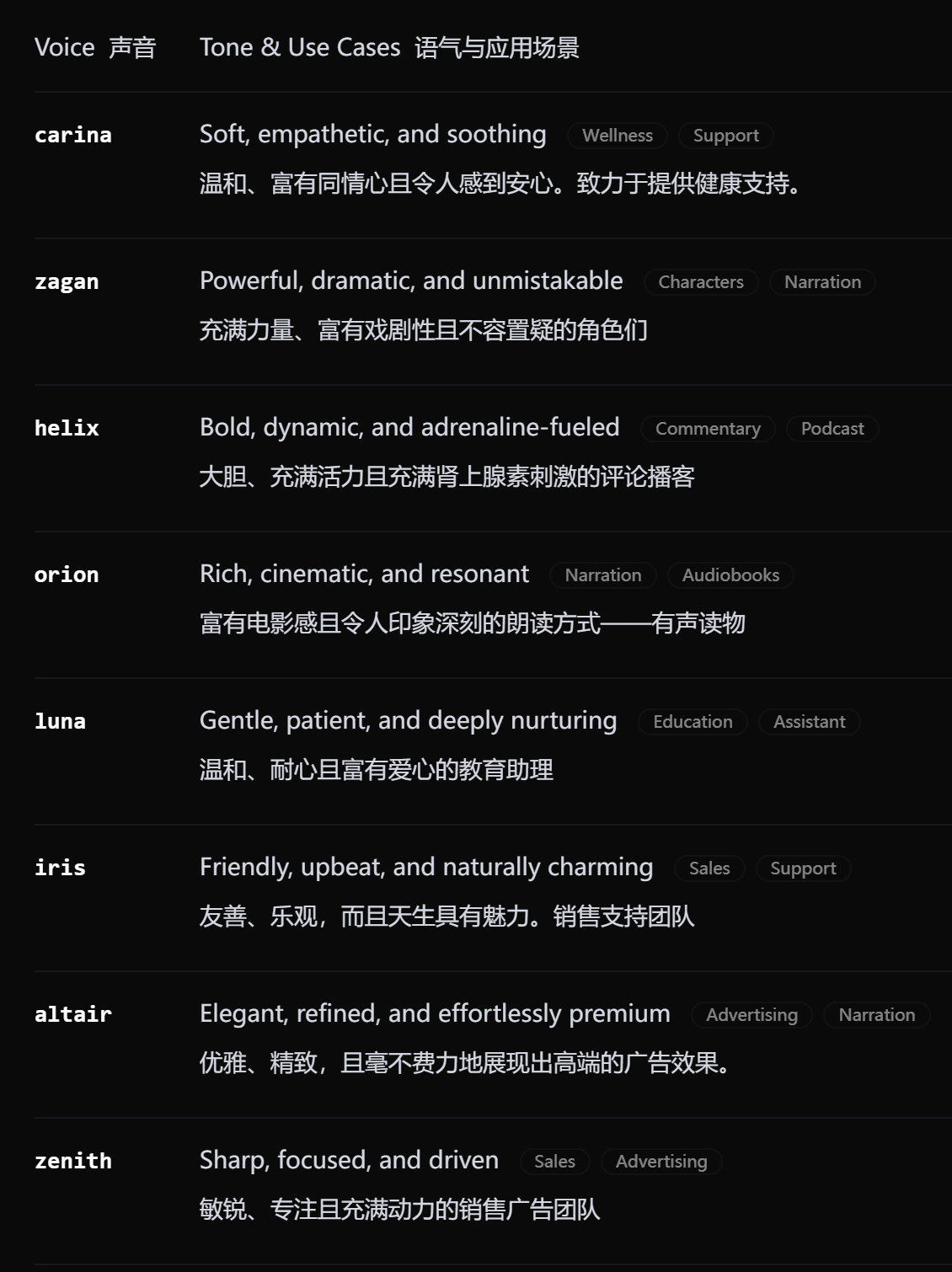
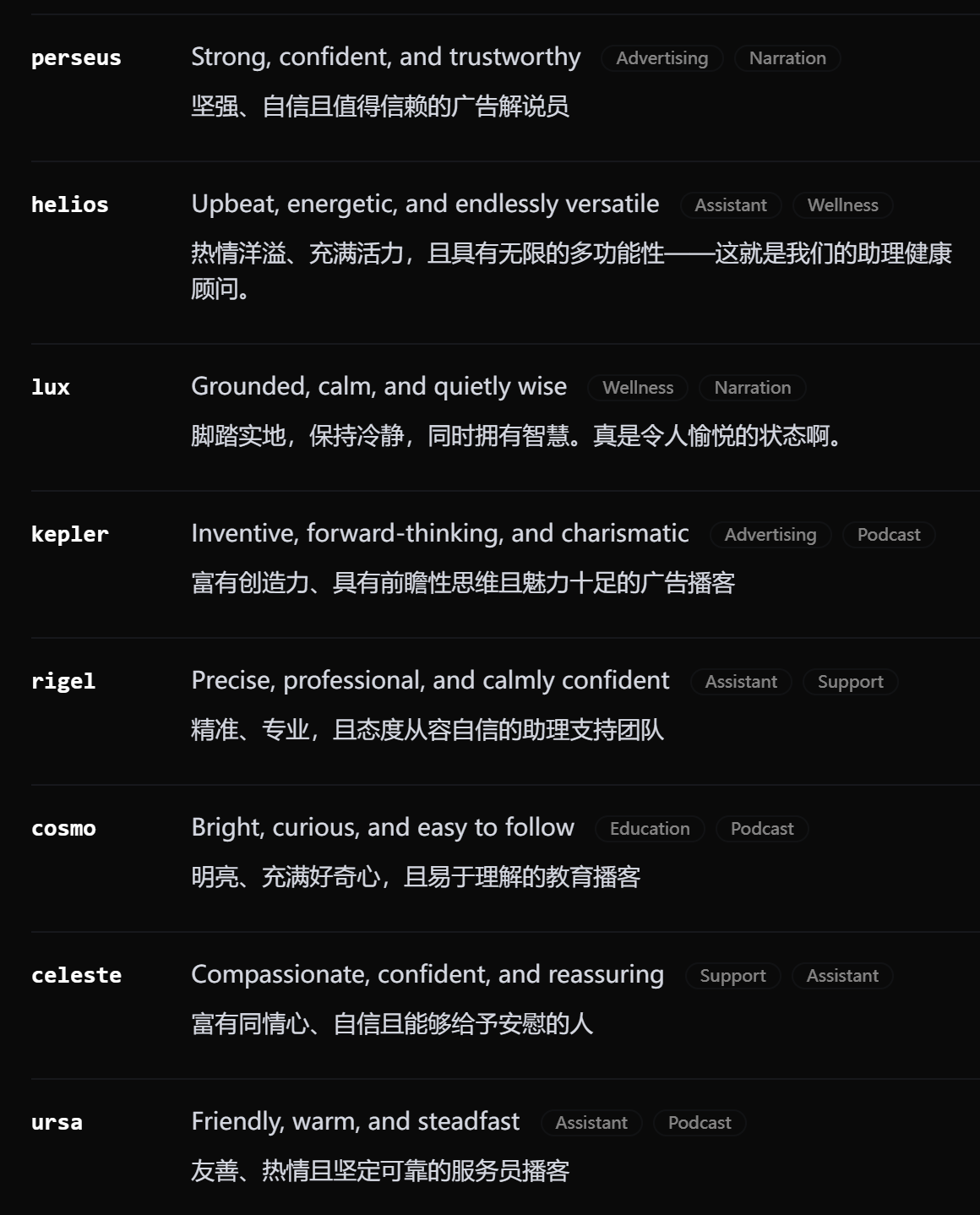
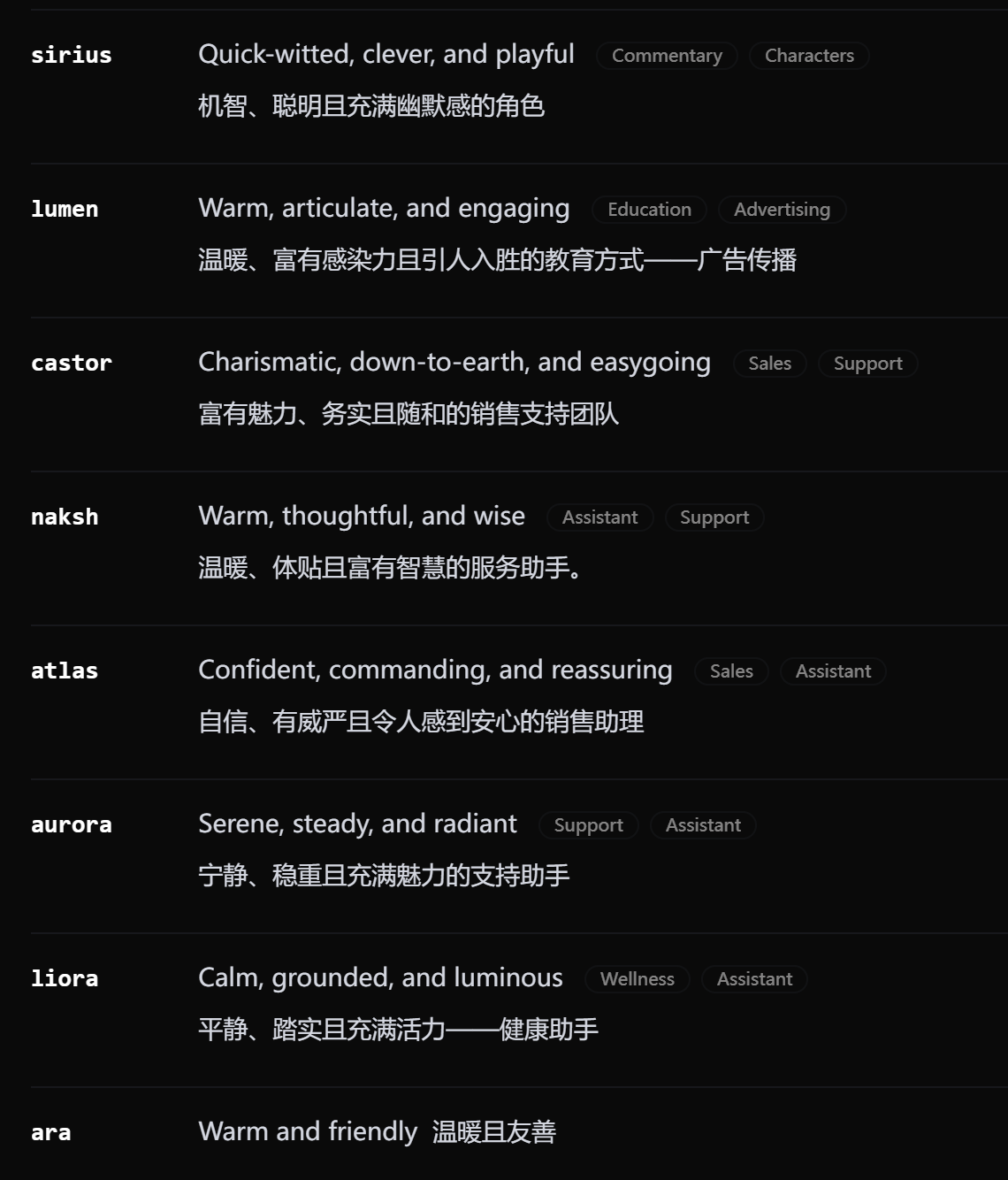
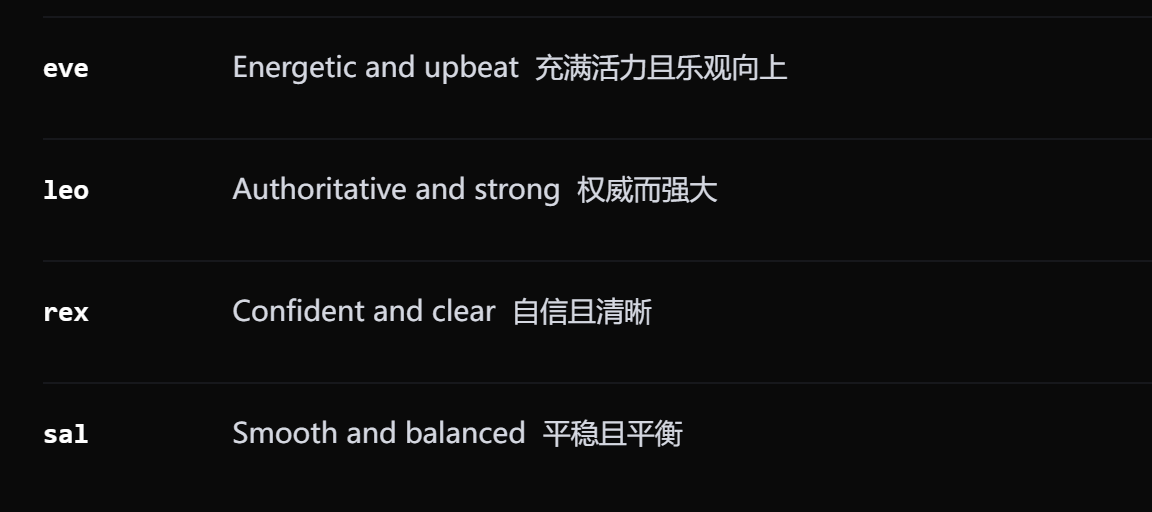
Grok Imagine Video 1.5 支持使用自定义音色来生成视频的音频部分。你可以通过 `audio` 参数指定音色 ID,模型会使用该音色生成视频的音频:
```bash theme={null}
curl --location --request POST 'https://geekai.co/api/v1/videos/generations' \
--header 'Content-Type: application/json' \
--header 'Authorization: Bearer $GEEKAI_API_KEY' \
--data '{
"model": "grok-imagine-video-1.5",
"prompt": "[图1]戴着眼镜穿着蓝色T恤的男生通过[音色1]的声音对着摄像头向观众介绍自己",
"images": [
"https://ark-project.tos-cn-beijing.volces.com/doc_image/seelite_ref_1.png"
],
"audio": [
"eve"
],
"async": true
}'
```
这些音色ID目前仅支持[系统内置音色](https://docs.x.ai/developers/model-capabilities/audio/text-to-speech#voices):