
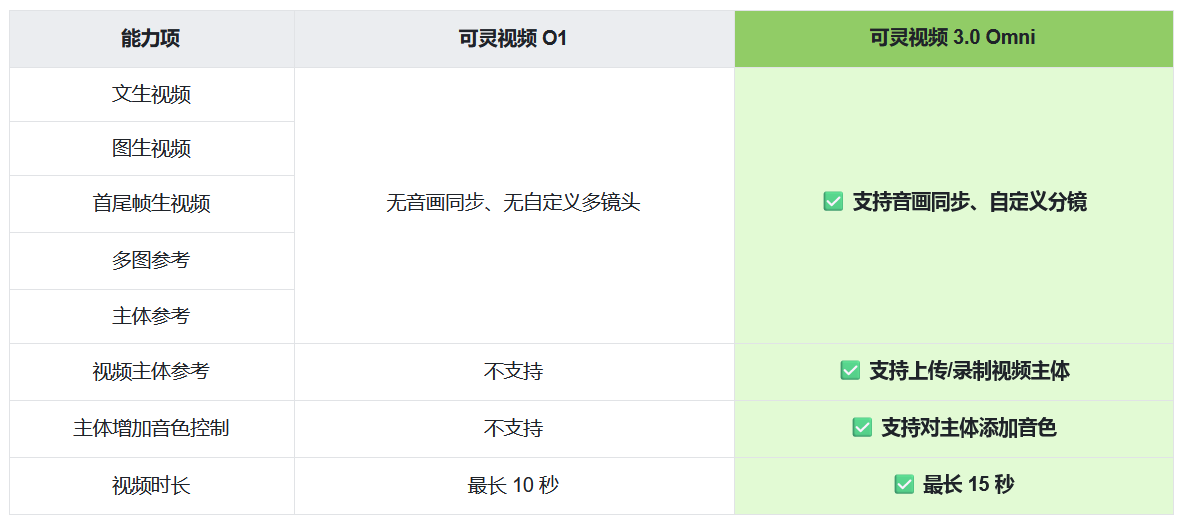
Model parameters
- Model ID:
kling-video-v3-omni - Pricing: see the model details page for current rates.
- Endpoint:
https://geekai.co/api/v1/videos/generations - Parameters: Video API reference
- Authentication: Get an API key
The following shared video API parameters are not supported:
negative_promptsizefps
aspect_ratio accepts the following values:
1:116:99:16
quality instead of the official mode to control resolution. quality accepts std (720p, standard), pro (1080p, HD), or 4k (v3 onward). The default is std. Quality affects generation time and cost.
Control sound with with_audio. with_audio accepts true (official audio = native) or false (official audio = off). The default is false. Generating audio takes longer and costs more.
Use watermark in place of the official watermark_info watermark parameter. watermark accepts true or false. The default, false, produces no watermark.
Set duration on Kling Video 3.0 Omni to generate 3–15 seconds (default: 5 seconds). Longer videos take more time and cost more.
Use extra_body to pass extra settings for shots, reference elements, and videos:
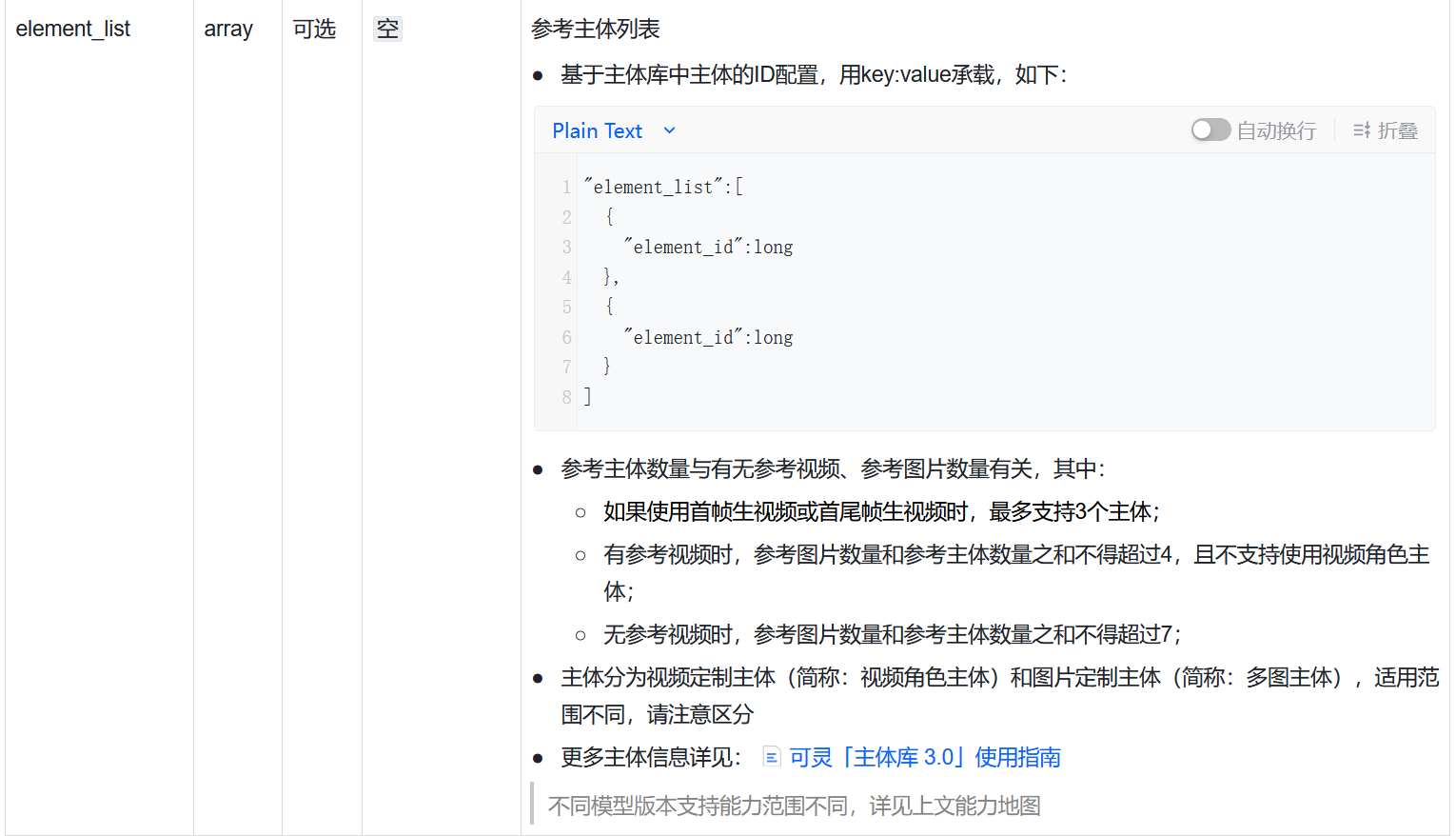
multi_shot: enable multiple shots. Acceptstrueorfalse(default:false). When enabled, set the shot type withshot_type.shot_type: shot type. Onlycustomize(custom shots) is supported. Required whenmulti_shotistrue.multi_prompt: per-shot details, including prompt and duration. Required whenmulti_shotistrueandshot_typeiscustomize.element_list: up to three element IDs from the element library.image_list: reference images for subjects, scenes, or styles. Images can also serve as first or last frames.video_list: reference videos, either for feature guidance or as videos to edit (default).
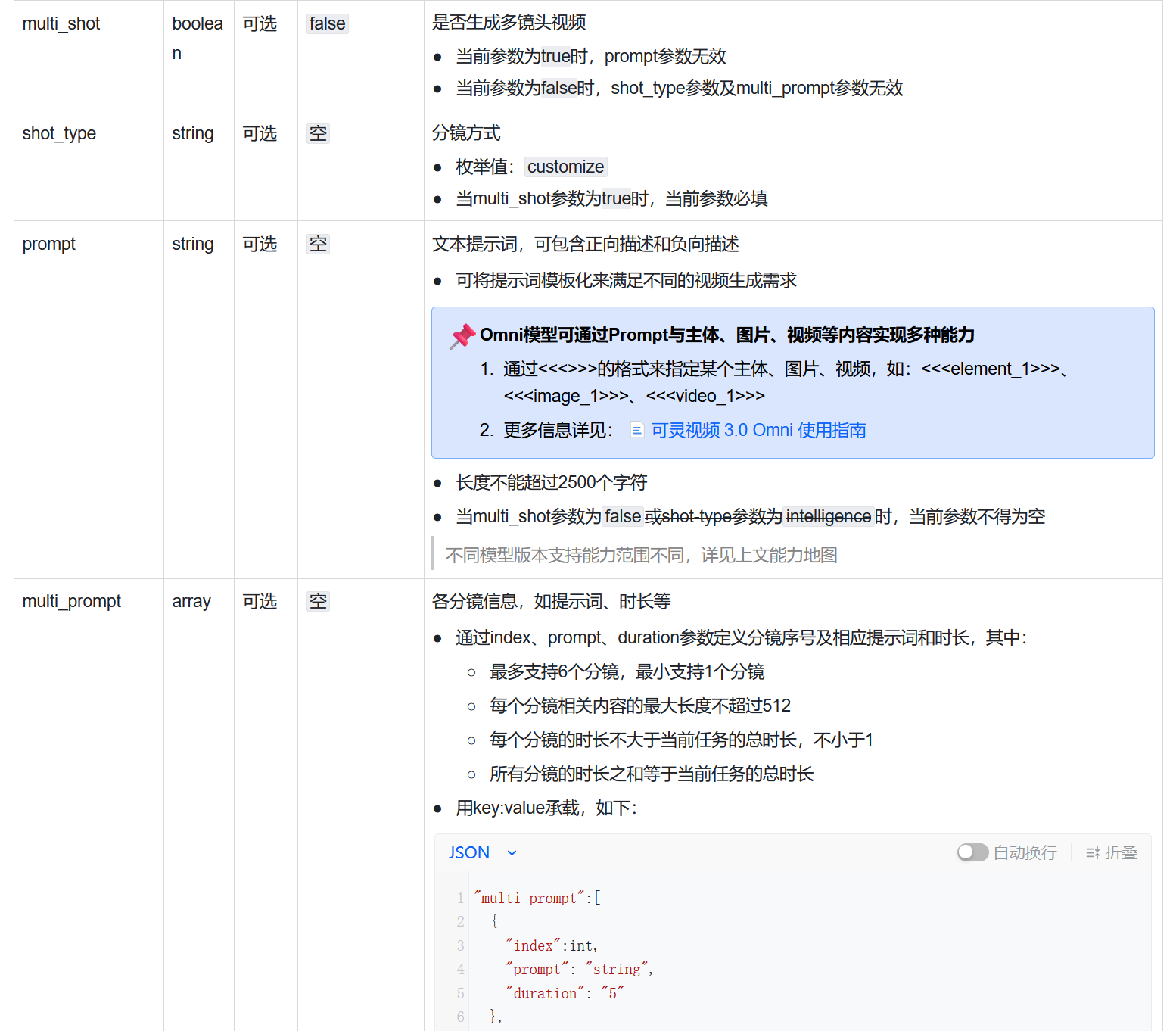 Kling Video 3.0 Omni also accepts these reference videos and elements through
extra_body:
video_list: reference videos for feature guidance or editing (default).image_list: reference images for subjects, scenes, or styles, or for use as first or last frames.element_list: reference elements.
Pricing
Kling Video 3.0 Omni pricing depends on quality, duration, and audio:
For discounted GeekAI channels, multiply the listed rate by the channel multiplier. On the high-availability, speed-first channel with multiplier
0.8, a standard 5-second silent video without a video reference costs 0.6 x 5 x 0.8 = 2.4 CNY.
Text to video
Describe the video in text:async to true to run asynchronously. See Asynchronous tasks below for result retrieval.
Image to video
First frame Pass one image inimage to generate a video starting from that frame:
image and image_tail:
images for subjects, scenes, and styles:
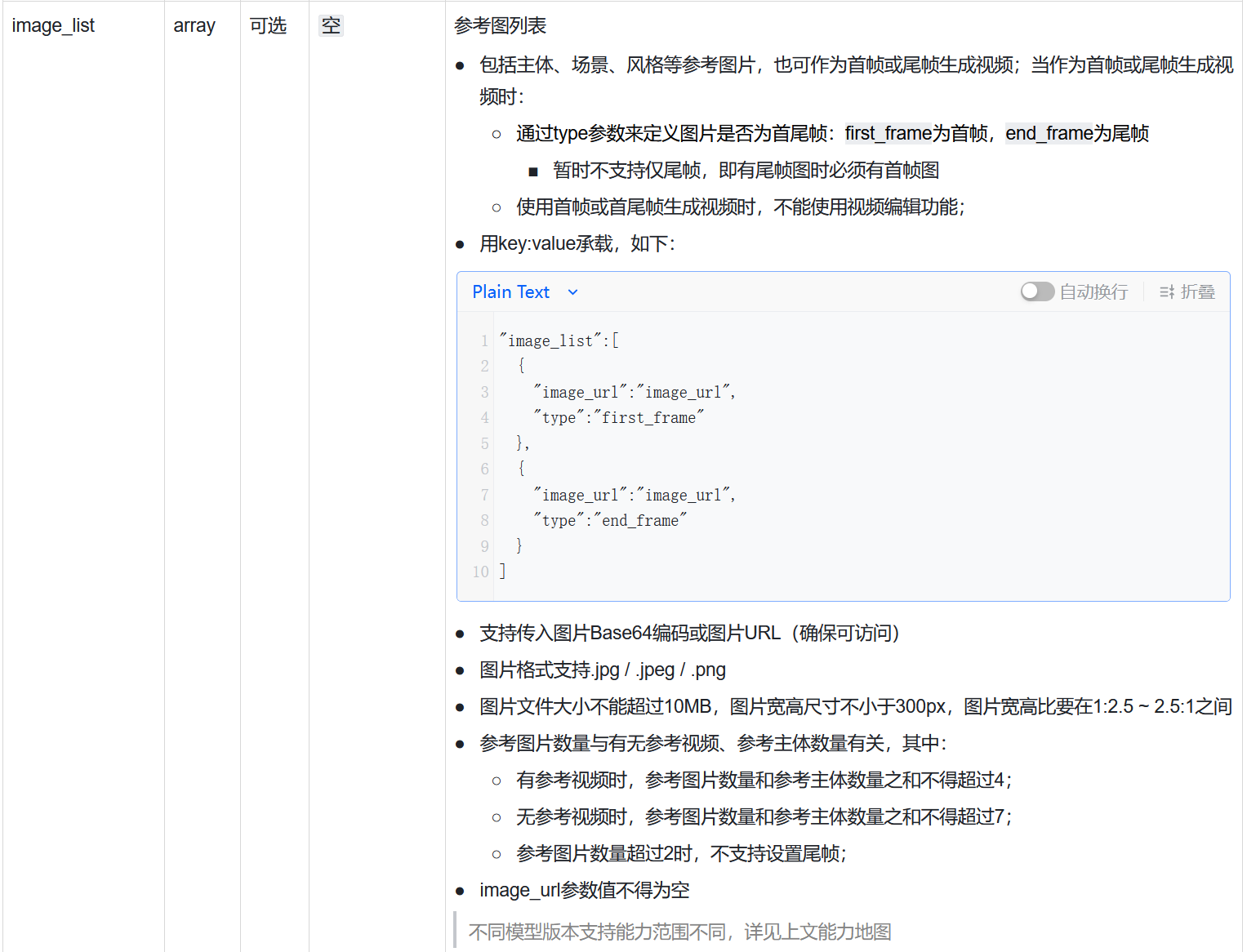
extra_body. Use type to identify first and last frames:
type:
- JPG, PNG, or WEBP; at most 10 MB per image.
- Pass a publicly accessible URL or Base64-encoded image data.
- Both dimensions at least 300 px; aspect ratio between 1:2.5 and 2.5:1.
- Without a reference video and with only multi-image elements, reference images plus multi-image elements must not exceed seven.
- Without a reference video but with a video element, reference images plus multi-image elements must not exceed four.
- With a reference video and only multi-image elements, reference images plus multi-image elements must not exceed four.
Reference videos
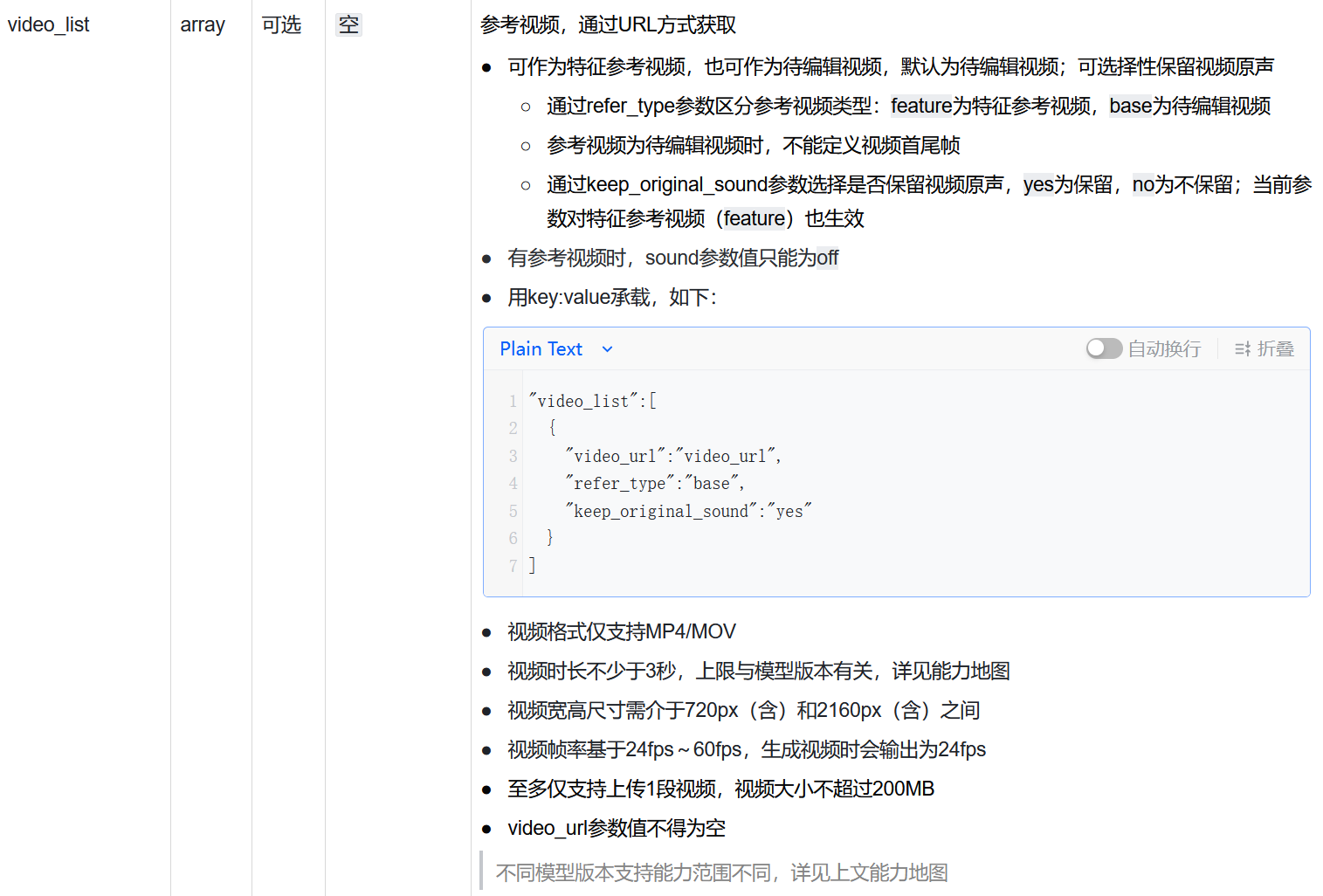
Video editing To edit a video with Kling Video 3.0 Omni, pass it inextra_body.video_list and set refer_type to base to mark it as the video to edit:
keep_original_sound to yes to retain the reference video’s original audio or no to discard it.
Video as a feature reference
To use the video as a feature reference instead, set refer_type to feature:
Multi-shot video
Useextra_body to control shots in Kling Video 3.0 Omni. This example generates a multi-shot video from an image:
image_list (Omni only). The first shot uses the image; later shots follow their respective prompts.
Custom elements
Kling Video 3.0 Omni accepts custom elements using the same parameters as Kling Video 3.0.Asynchronous tasks
The video API usesasync to control asynchronous generation. The default, false, waits for the finished video. Set it to true to receive a task ID you can poll.
Create a generation task
task_status field has four possible values:
pending: created and waiting for processingrunning: processingsucceed: completed successfully; the result is availablefailed: failed, possibly due to a content restriction or another error
succeed, then retrieve the generated video URL: