
身份证识别接口
curl --request POST \
  --url https://geekai.co/api/v1/idcard/recognize \
  --header 'Authorization: Bearer <token>' \
  --header 'Content-Type: application/json' \
  --data '
{
  "image": "",
  "model": "glm-4v-flash"
}
'
import requests
url = "https://geekai.co/api/v1/idcard/recognize"
payload = {
"image": "",
"model": "glm-4v-flash"
}
headers = {
"Authorization": "Bearer <token>",
"Content-Type": "application/json"
}
response = requests.post(url, json=payload, headers=headers)
print(response.text)const options = {
method: 'POST',
headers: {Authorization: 'Bearer <token>', 'Content-Type': 'application/json'},
body: JSON.stringify({image: '', model: 'glm-4v-flash'})
};
fetch('https://geekai.co/api/v1/idcard/recognize', options)
.then(res => res.json())
.then(res => console.log(res))
.catch(err => console.error(err));<?php
$curl = curl_init();
curl_setopt_array($curl, [
CURLOPT_URL => "https://geekai.co/api/v1/idcard/recognize",
CURLOPT_RETURNTRANSFER => true,
CURLOPT_ENCODING => "",
CURLOPT_MAXREDIRS => 10,
CURLOPT_TIMEOUT => 30,
CURLOPT_HTTP_VERSION => CURL_HTTP_VERSION_1_1,
CURLOPT_CUSTOMREQUEST => "POST",
CURLOPT_POSTFIELDS => json_encode([
'image' => '',
'model' => 'glm-4v-flash'
]),
CURLOPT_HTTPHEADER => [
"Authorization: Bearer <token>",
"Content-Type: application/json"
],
]);
$response = curl_exec($curl);
$err = curl_error($curl);
curl_close($curl);
if ($err) {
echo "cURL Error #:" . $err;
} else {
echo $response;
}package main
import (
"fmt"
"strings"
"net/http"
"io"
)
func main() {
url := "https://geekai.co/api/v1/idcard/recognize"
payload := strings.NewReader("{\n \"image\": \"\",\n \"model\": \"glm-4v-flash\"\n}")
req, _ := http.NewRequest("POST", url, payload)
req.Header.Add("Authorization", "Bearer <token>")
req.Header.Add("Content-Type", "application/json")
res, _ := http.DefaultClient.Do(req)
defer res.Body.Close()
body, _ := io.ReadAll(res.Body)
fmt.Println(string(body))
}HttpResponse<String> response = Unirest.post("https://geekai.co/api/v1/idcard/recognize")
.header("Authorization", "Bearer <token>")
.header("Content-Type", "application/json")
.body("{\n \"image\": \"\",\n \"model\": \"glm-4v-flash\"\n}")
.asString();require 'uri'
require 'net/http'
url = URI("https://geekai.co/api/v1/idcard/recognize")
http = Net::HTTP.new(url.host, url.port)
http.use_ssl = true
request = Net::HTTP::Post.new(url)
request["Authorization"] = 'Bearer <token>'
request["Content-Type"] = 'application/json'
request.body = "{\n \"image\": \"\",\n \"model\": \"glm-4v-flash\"\n}"
response = http.request(request)
puts response.read_body{
"name": "张三",
"sex": "男",
"nation": "汉",
"birth": "2025年2月10日",
"address": "浙江省杭州市上城区XX小区XX幢元XX室",
"id": "<string>"
}{
"code": "invalid_image",
"message": "图片格式不支持或无法访问"
}{
"code": "unauthorized",
"message": "Invalid API key or token"
}{
"code": "image_too_large",
"message": "图片大小超过5MB限制"
}{
"code": "invalid_request",
"message": "请求参数不合法"
}OCR服务
身份证识别
POST
/
idcard
/
recognize
身份证识别接口
curl --request POST \
  --url https://geekai.co/api/v1/idcard/recognize \
  --header 'Authorization: Bearer <token>' \
  --header 'Content-Type: application/json' \
  --data '
{
  "image": "",
  "model": "glm-4v-flash"
}
'
import requests
url = "https://geekai.co/api/v1/idcard/recognize"
payload = {
"image": "",
"model": "glm-4v-flash"
}
headers = {
"Authorization": "Bearer <token>",
"Content-Type": "application/json"
}
response = requests.post(url, json=payload, headers=headers)
print(response.text)const options = {
method: 'POST',
headers: {Authorization: 'Bearer <token>', 'Content-Type': 'application/json'},
body: JSON.stringify({image: '', model: 'glm-4v-flash'})
};
fetch('https://geekai.co/api/v1/idcard/recognize', options)
.then(res => res.json())
.then(res => console.log(res))
.catch(err => console.error(err));<?php
$curl = curl_init();
curl_setopt_array($curl, [
CURLOPT_URL => "https://geekai.co/api/v1/idcard/recognize",
CURLOPT_RETURNTRANSFER => true,
CURLOPT_ENCODING => "",
CURLOPT_MAXREDIRS => 10,
CURLOPT_TIMEOUT => 30,
CURLOPT_HTTP_VERSION => CURL_HTTP_VERSION_1_1,
CURLOPT_CUSTOMREQUEST => "POST",
CURLOPT_POSTFIELDS => json_encode([
'image' => '',
'model' => 'glm-4v-flash'
]),
CURLOPT_HTTPHEADER => [
"Authorization: Bearer <token>",
"Content-Type: application/json"
],
]);
$response = curl_exec($curl);
$err = curl_error($curl);
curl_close($curl);
if ($err) {
echo "cURL Error #:" . $err;
} else {
echo $response;
}package main
import (
"fmt"
"strings"
"net/http"
"io"
)
func main() {
url := "https://geekai.co/api/v1/idcard/recognize"
payload := strings.NewReader("{\n \"image\": \"\",\n \"model\": \"glm-4v-flash\"\n}")
req, _ := http.NewRequest("POST", url, payload)
req.Header.Add("Authorization", "Bearer <token>")
req.Header.Add("Content-Type", "application/json")
res, _ := http.DefaultClient.Do(req)
defer res.Body.Close()
body, _ := io.ReadAll(res.Body)
fmt.Println(string(body))
}HttpResponse<String> response = Unirest.post("https://geekai.co/api/v1/idcard/recognize")
.header("Authorization", "Bearer <token>")
.header("Content-Type", "application/json")
.body("{\n \"image\": \"\",\n \"model\": \"glm-4v-flash\"\n}")
.asString();require 'uri'
require 'net/http'
url = URI("https://geekai.co/api/v1/idcard/recognize")
http = Net::HTTP.new(url.host, url.port)
http.use_ssl = true
request = Net::HTTP::Post.new(url)
request["Authorization"] = 'Bearer <token>'
request["Content-Type"] = 'application/json'
request.body = "{\n \"image\": \"\",\n \"model\": \"glm-4v-flash\"\n}"
response = http.request(request)
puts response.read_body{
"name": "张三",
"sex": "男",
"nation": "汉",
"birth": "2025年2月10日",
"address": "浙江省杭州市上城区XX小区XX幢元XX室",
"id": "<string>"
}{
"code": "invalid_image",
"message": "图片格式不支持或无法访问"
}{
"code": "unauthorized",
"message": "Invalid API key or token"
}{
"code": "image_too_large",
"message": "图片大小超过5MB限制"
}{
"code": "invalid_request",
"message": "请求参数不合法"
}注:model 值不传递默认使用免费的 glm-4v-flash,你也可以在模型广场选择极客智坊支持的其他图片识别模型,费用以列表显示的模型价格(API)为准。
cURL 请求示例
curl --location 'https://geekai.co/api/v1/idcard/recognize' \
--header 'Content-Type: application/json' \
--header 'Authorization: Bearer {YOUR_GEEKAI_API_KEY}' \
--data '{
    "image": "https://example.com/idcard.jpg"
}'
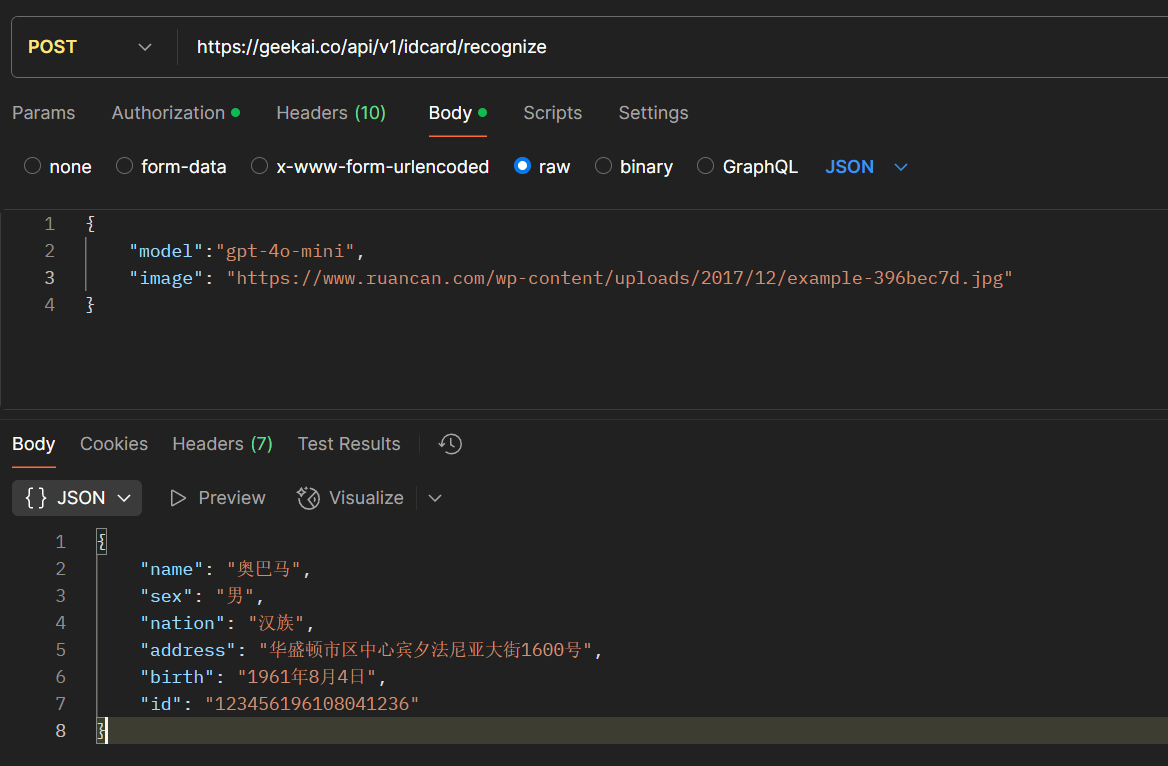
Postman 请求响应示例
授权
bearerAuthapiKeyAuth
API认证token
请求体
application/json
此页面对您有帮助吗?