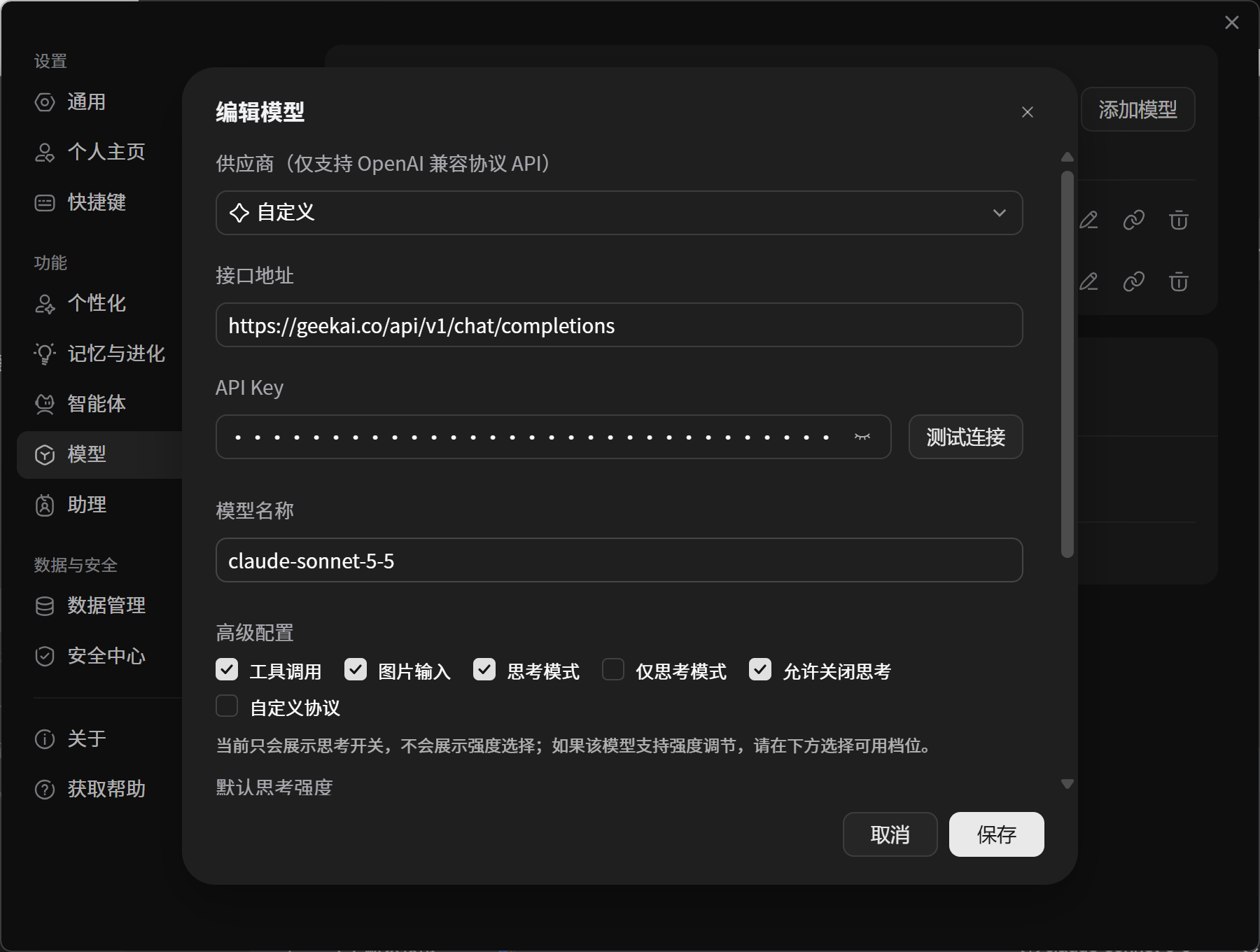
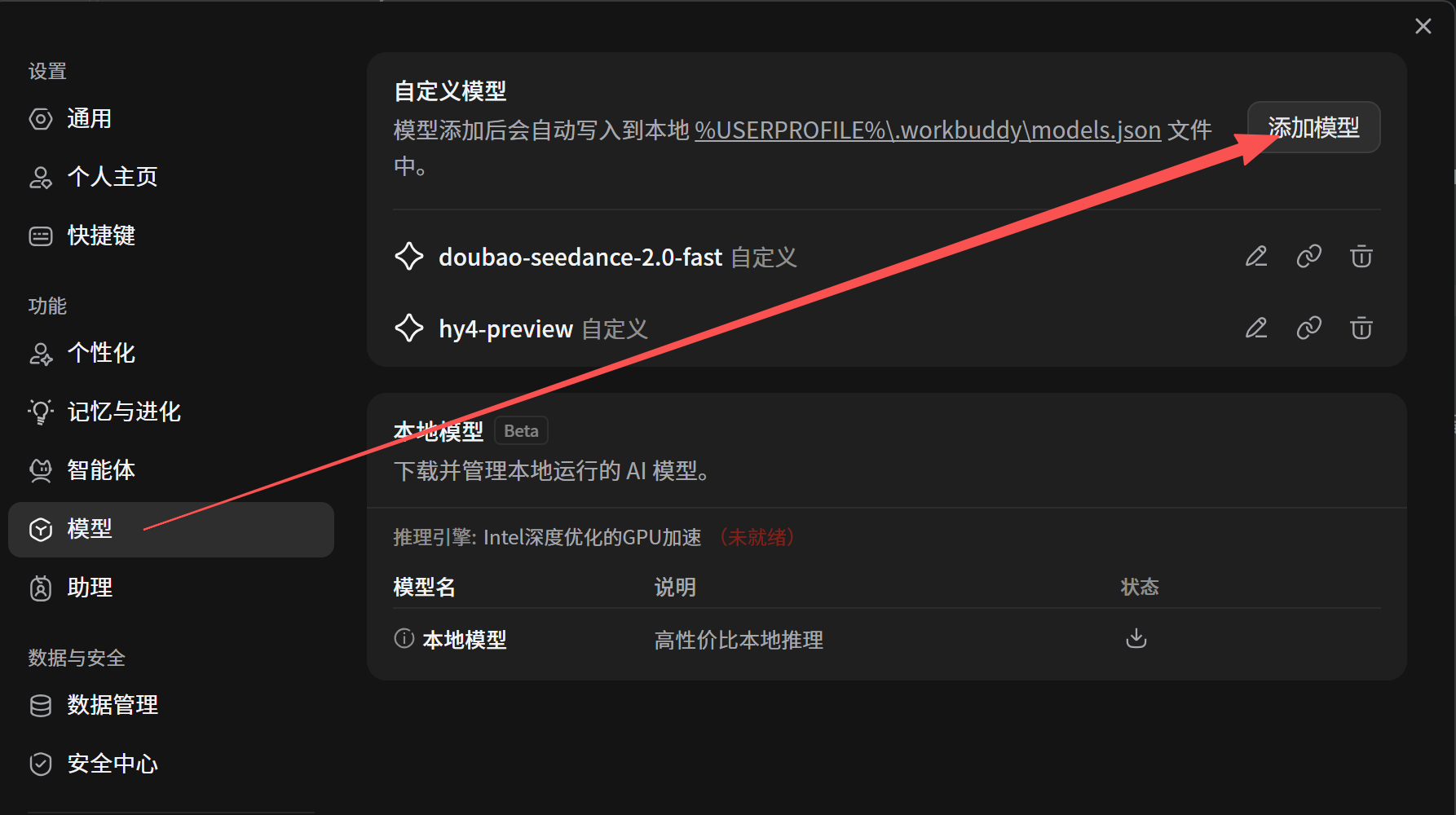
In WorkBuddy settings, open the model configuration page and click Add Model in the upper-right corner.Select Custom as the provider and enter your GeekAI API URL and key:
If your model supports image recognition and reasoning, enable those options.
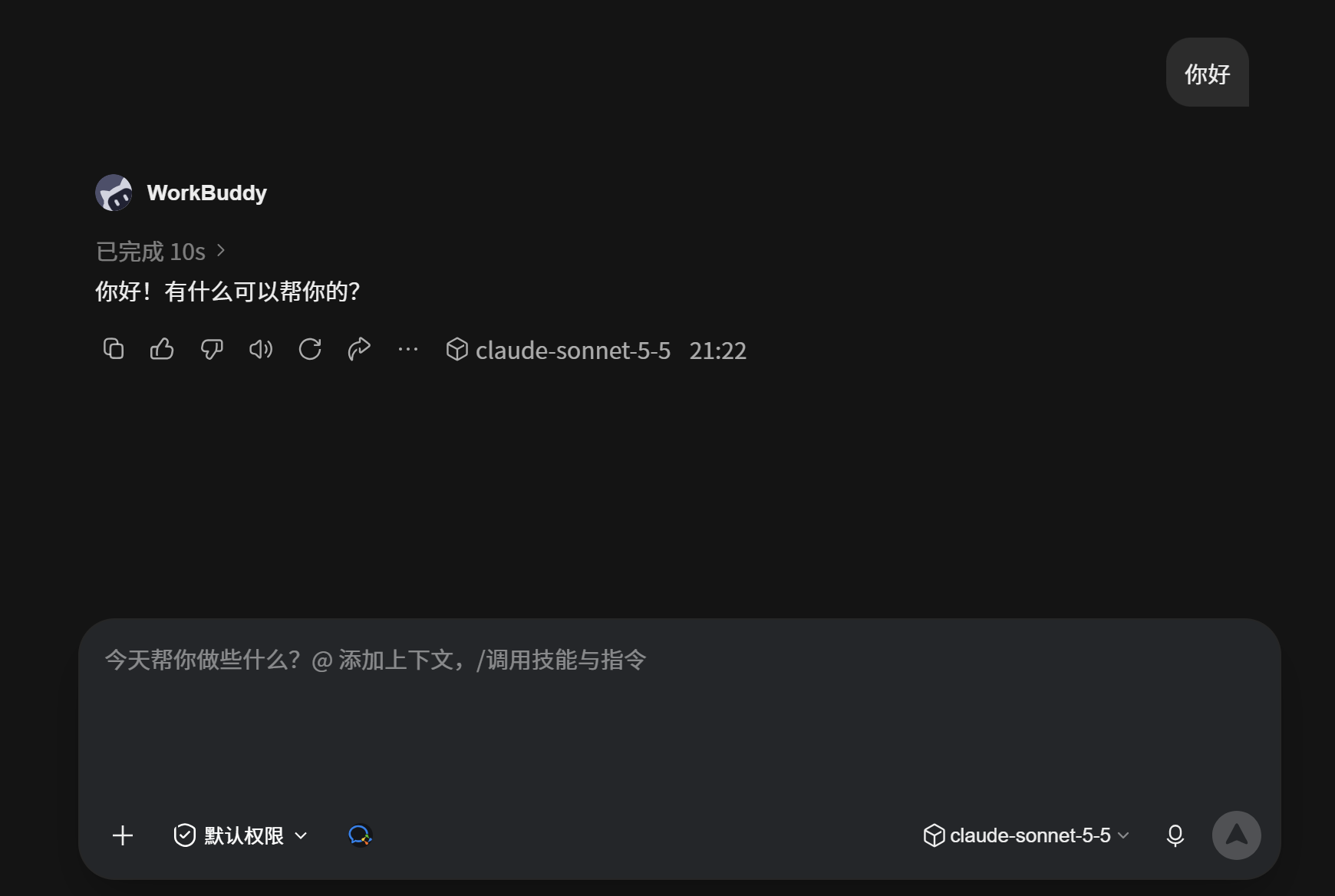
Click Test Connection. Once the test succeeds, click Save, then open a chat to use the model:
Was this page helpful?
{"docsConfig":{"theme":"mint","$schema":"https://mintlify.com/docs.json","name":"极客智坊","colors":{"primary":"#16A34A","light":"#07C983","dark":"#15803D"},"logo":{"light":"https://mintcdn.com/geekai/O3NwfoCr_3liylVV/logo/geekai-logo.png?fit=max\u0026auto=format\u0026n=O3NwfoCr_3liylVV\u0026q=85\u0026s=8edc923acd300ea2b9049b14795c8c7a","dark":"https://mintcdn.com/geekai/O3NwfoCr_3liylVV/logo/geekai-logo.png?fit=max\u0026auto=format\u0026n=O3NwfoCr_3liylVV\u0026q=85\u0026s=8edc923acd300ea2b9049b14795c8c7a"},"favicon":"https://mintcdn.com/geekai/O3NwfoCr_3liylVV/geekai-icon.webp?fit=max\u0026auto=format\u0026n=O3NwfoCr_3liylVV\u0026q=85\u0026s=b0091b79891520b5d274b34c5ea4e970","navbar":{"links":[{"href":"https://geekai.co/models","label":"模型广场"}],"primary":{"type":"button","label":"模型体验","href":"https://geekai.co/chat"}},"seo":{"metatags":{"og:image":"/geekai-icon.webp"},"indexing":"all"},"styling":{"latex":false},"navigation":{"languages":[{"language":"cn","href":"cn/docs/introduction"},{"language":"en","href":"en/docs/introduction"}]}},"deployment":{"deploymentMetadataValue":{"subdomain":"geekai","hasAudioNarration":false,"actualSubdomain":"geekai","customDomains":["docs.geekai.co"],"gitSource":{"type":"github","owner":"geekai-pub","repo":"geekai-docs","deployBranch":"main","contentDirectory":"","isPrivate":true,"mountPath":"","label":""},"feedback":{"thumbs":true},"entitlements":{},"buildId":"6b07a55e572bfd109977425b","clientVersion":"0.0.4336","searchFilterCounts":[{"language":"cn","tag":"画图模型","count":46},{"language":"cn","tag":"视频模型","count":46},{"language":"en","tag":"Image Models","count":46},{"language":"en","tag":"Video Models","count":46},{"language":"cn","tag":"API手册","count":44},{"language":"en","tag":"API Reference","count":44},{"language":"cn","tag":"文本模型","count":38},{"language":"en","tag":"Text Models","count":38},{"language":"cn","tag":"第三方集成","count":26},{"language":"cn","tag":"第三方应用集成","count":26},{"language":"en","tag":"Integrations","count":26},{"language":"en","tag":"Third-Party Applications","count":26},{"language":"cn","tag":"Chat API","count":14},{"language":"en","tag":"Chat API","count":14},{"language":"cn","tag":"字节豆包","count":11},{"language":"en","tag":"ByteDance Doubao","count":11},{"language":"cn","tag":"可灵AI","count":10},{"language":"en","tag":"Kling AI","count":10},{"language":"cn","tag":"语音模型","count":9},{"language":"en","tag":"Audio Models","count":9}]},"assistantConfig":{},"basePath":"","hasChatPermissions":false,"hasWebMcpPermissions":false,"toggles":[{"name":"kill-isr","enabled":true,"variant":{"name":"disabled","enabled":false,"feature_enabled":true},"impressionData":false},{"name":"custom-rbac-roles","enabled":true,"variant":{"name":"disabled","enabled":false,"feature_enabled":true},"impressionData":false},{"name":"agent-mintlify-slack","enabled":true,"variant":{"name":"disabled","enabled":false,"feature_enabled":true},"impressionData":false},{"name":"agent-integrations-settings","enabled":true,"variant":{"name":"disabled","enabled":false,"feature_enabled":true},"impressionData":false},{"name":"rbac-expansion","enabled":true,"variant":{"name":"disabled","enabled":false,"feature_enabled":true},"impressionData":false},{"name":"automations-pr-grouping","enabled":true,"variant":{"name":"disabled","enabled":false,"feature_enabled":true},"impressionData":false},{"name":"custom-prefix","enabled":true,"variant":{"name":"disabled","enabled":false,"feature_enabled":true},"impressionData":false},{"name":"analytics-v7","enabled":true,"variant":{"name":"disabled","enabled":false,"feature_enabled":true},"impressionData":false},{"name":"user-flows-analytics","enabled":true,"variant":{"name":"disabled","enabled":false,"feature_enabled":true},"impressionData":false},{"name":"no-publish-flow","enabled":true,"variant":{"name":"disabled","enabled":false,"feature_enabled":true},"impressionData":false},{"name":"snapshot-serving-live","enabled":true,"variant":{"name":"disabled","enabled":false,"feature_enabled":true},"impressionData":false},{"name":"stripTemperatureMiddleware","enabled":true,"variant":{"name":"disabled","enabled":false,"feature_enabled":true},"impressionData":false},{"name":"support-platform-pylon-zendesk","enabled":true,"variant":{"name":"disabled","enabled":false,"feature_enabled":true},"impressionData":false},{"name":"snapshot-serving","enabled":true,"variant":{"name":"disabled","enabled":false,"feature_enabled":true},"impressionData":false},{"name":"instant-rollback","enabled":true,"variant":{"name":"disabled","enabled":false,"feature_enabled":true},"impressionData":false},{"name":"granular-notifications-server","enabled":true,"variant":{"name":"disabled","enabled":false,"feature_enabled":true},"impressionData":false},{"name":"granular-notifications","enabled":true,"variant":{"name":"disabled","enabled":false,"feature_enabled":true},"impressionData":false},{"name":"automations-fable","enabled":true,"variant":{"name":"disabled","enabled":false,"feature_enabled":true},"impressionData":false},{"name":"fixed-ai-action-pricing","enabled":true,"variant":{"name":"disabled","enabled":false,"feature_enabled":true},"impressionData":false},{"name":"site-roles","enabled":true,"variant":{"name":"disabled","enabled":false,"feature_enabled":true},"impressionData":false},{"name":"automation-resolve-merge-conflict","enabled":true,"variant":{"name":"disabled","enabled":false,"feature_enabled":true},"impressionData":false},{"name":"scoped-publishing","enabled":true,"variant":{"name":"disabled","enabled":false,"feature_enabled":true},"impressionData":false},{"name":"mintql","enabled":true,"variant":{"name":"disabled","enabled":false,"feature_enabled":true},"impressionData":false},{"name":"page-level-analytics","enabled":true,"variant":{"name":"disabled","enabled":false,"feature_enabled":true},"impressionData":false},{"name":"editor-version-history-v2","enabled":true,"variant":{"name":"disabled","enabled":false,"feature_enabled":true},"impressionData":false},{"name":"billing-page-v2","enabled":true,"variant":{"name":"disabled","enabled":false,"feature_enabled":true},"impressionData":false},{"name":"full-page-search","enabled":true,"variant":{"name":"disabled","enabled":false,"feature_enabled":true},"impressionData":false},{"name":"workspace-projects","enabled":true,"variant":{"name":"disabled","enabled":false,"feature_enabled":true},"impressionData":false},{"name":"fork-pr-previews","enabled":true,"variant":{"name":"disabled","enabled":false,"feature_enabled":true},"impressionData":false},{"name":"revalidation-jwt","enabled":true,"variant":{"name":"disabled","enabled":false,"feature_enabled":true},"impressionData":false},{"name":"hobby-abuse-scan","enabled":true,"variant":{"name":"disabled","enabled":false,"feature_enabled":true},"impressionData":false},{"name":"dashboard-inbox","enabled":true,"variant":{"name":"disabled","enabled":false,"feature_enabled":true},"impressionData":false},{"name":"turbopuffer-dual-write","enabled":true,"variant":{"name":"disabled","enabled":false,"feature_enabled":true},"impressionData":false},{"name":"approve-review-flow","enabled":true,"variant":{"name":"disabled","enabled":false,"feature_enabled":true},"impressionData":false},{"name":"editor-metadata","enabled":true,"variant":{"name":"disabled","enabled":false,"feature_enabled":true},"impressionData":false},{"name":"turbopuffer-serve","enabled":true,"variant":{"name":"disabled","enabled":false,"feature_enabled":true},"impressionData":false},{"name":"live-agents","enabled":true,"variant":{"name":"disabled","enabled":false,"feature_enabled":true},"impressionData":false},{"name":"starter-pricing","enabled":true,"variant":{"name":"treatment","enabled":true,"payload":{"type":"string","value":"treatment"},"feature_enabled":true},"impressionData":false},{"name":"llms-txt-v2","enabled":true,"variant":{"name":"disabled","enabled":false,"feature_enabled":true},"impressionData":false},{"name":"wildcard-email-auth","enabled":true,"variant":{"name":"disabled","enabled":false,"feature_enabled":true},"impressionData":false}],"starterQuestions":[],"googleFontsInlined":false},"customCss":[]}
{"page":{"pagePath":"en/cases/workbuddy","slug":"/en/cases/workbuddy","pageMetadata":{"title":"WorkBuddy","sidebarTitle":"WorkBuddy","description":null,"href":"/en/cases/workbuddy"},"pageType":"default","mdx":{"mdxSource":{"compiledSource":"\"use strict\";const{Fragment:_Fragment,jsx:_jsx,jsxs:_jsxs}=arguments[0];const{useMDXComponents:_provideComponents}=arguments[0];function _createMdxContent(props){const _components={a:`a`,p:`p`,strong:`strong`,..._provideComponents(),...props.components},{Note,OptimizedImage}=_components;if(!Note)_missingMdxReference(`Note`,true);if(!OptimizedImage)_missingMdxReference(`OptimizedImage`,true);return _jsxs(_Fragment,{children:[_jsxs(_components.p,{children:[`In `,_jsx(_components.a,{href:`https://www.workbuddy.cn/`,children:`WorkBuddy`}),` settings, open the model configuration page and click `,_jsx(_components.strong,{children:`Add Model`}),` in the upper-right corner.`]}),`\n`,_jsx(OptimizedImage,{src:`https://static.geekai.co/storage/image-20261007210208732.png`,className:`mint-mt-2`,alt:`WorkBuddy model settings`}),`\n`,_jsxs(_components.p,{children:[`Select `,_jsx(_components.strong,{children:`Custom`}),` as the provider and enter your GeekAI API URL and key:`]}),`\n`,_jsx(OptimizedImage,{src:`https://static.geekai.co/storage/image-20261007212424021.png`,className:`mint-mt-2`,alt:`Custom provider settings in WorkBuddy`}),`\n`,_jsx(Note,{children:_jsx(_components.p,{children:`If your model supports image recognition and reasoning, enable those options.`})}),`\n`,_jsxs(_components.p,{children:[`Click `,_jsx(_components.strong,{children:`Test Connection`}),`. Once the test succeeds, click `,_jsx(_components.strong,{children:`Save`}),`, then open a chat to use the model:`]}),`\n`,_jsx(OptimizedImage,{src:`https://static.geekai.co/storage/image-20261007212326352.png`,className:`mint-mt-2`,alt:`Chatting with a GeekAI model in WorkBuddy`})]})}function MDXContent(props={}){const{wrapper:MDXLayout}={..._provideComponents(),...props.components};return MDXLayout?_jsx(MDXLayout,{...props,children:_jsx(_createMdxContent,{...props})}):_createMdxContent(props)}return{default:MDXContent};function _missingMdxReference(id,component){throw new Error(`Expected `+(component?`component`:`object`)+\" `\"+id+\"` to be defined: you likely forgot to import, pass, or provide it.\")}","frontmatter":{},"scope":{"config":{},"pageMetadata":{"title":"WorkBuddy","sidebarTitle":"WorkBuddy","description":null,"href":"/en/cases/workbuddy"}}},"mdxSourceWithNoJs":null},"mdxExtracts":{"tableOfContents":[],"codeExamples":{}},"jsLinks":[],"dynamicCss":".mint-mt-2 {\n margin-top: 0.5rem\n}","subdomain":"geekai","siteName":"极客智坊","title":"WorkBuddy - 极客智坊","contextualStarterQuestions":[],"navMaps":{"firstHrefInVersion":{},"firstHrefInLanguage":{"cn":{"href":"/cn/cases/workbuddy","matchLevel":1},"en":{"href":"/en/cases/workbuddy","matchLevel":0}}},"lastModified":"2026-11-25T08:28:26.969Z","originalFileLocation":"en/cases/workbuddy.mdx","locale":"en"},"headHtml":"\u003cscript data-mint-head>(function(){var d=document.documentElement,p=null;if(!p){try{p=localStorage.getItem(\"isDarkMode\")}catch(e){}if(p==='true')p='dark';else if(p==='false')p='light';if(p!=='light'\u0026\u0026p!=='dark'\u0026\u0026p!=='system')p=\"system\"}var r=p==='system'?(matchMedia(\"(prefers-color-scheme: dark)\").matches?'dark':'light'):p;d.classList.remove(r==='dark'?'light':'dark');d.classList.add(r);d.setAttribute(\"data-theme-preference\",p)})();\u003c/script>\u003cmeta data-mint-head name=\"application-name\" content=\"极客智坊\">\u003cmeta data-mint-head name=\"generator\" content=\"Mintlify\">\u003clink data-mint-head rel=\"icon\" type=\"image/png\" sizes=\"192x192\" href=\"/mintlify-assets/_mintlify/favicons/geekai/4IycdE7H9LjTJ-KO/_generated/favicon/android-chrome-192x192.png\" media=\"(prefers-color-scheme: light)\">\u003clink data-mint-head rel=\"apple-touch-icon\" type=\"image/png\" sizes=\"180x180\" href=\"/mintlify-assets/_mintlify/favicons/geekai/4IycdE7H9LjTJ-KO/_generated/favicon/apple-touch-icon.png\">\u003clink data-mint-head rel=\"icon\" type=\"image/png\" sizes=\"16x16\" href=\"/mintlify-assets/_mintlify/favicons/geekai/4IycdE7H9LjTJ-KO/_generated/favicon/favicon-16x16.png\" media=\"(prefers-color-scheme: light)\">\u003clink data-mint-head rel=\"icon\" type=\"image/png\" sizes=\"32x32\" href=\"/mintlify-assets/_mintlify/favicons/geekai/4IycdE7H9LjTJ-KO/_generated/favicon/favicon-32x32.png\" media=\"(prefers-color-scheme: light)\">\u003clink data-mint-head rel=\"shortcut icon\" type=\"image/x-icon\" href=\"/mintlify-assets/_mintlify/favicons/geekai/4IycdE7H9LjTJ-KO/_generated/favicon/favicon.ico\" media=\"(prefers-color-scheme: light)\">\u003clink data-mint-head rel=\"icon\" type=\"image/png\" sizes=\"192x192\" href=\"/mintlify-assets/_mintlify/favicons/geekai/4IycdE7H9LjTJ-KO/_generated/favicon-dark/android-chrome-192x192.png\" media=\"(prefers-color-scheme: dark)\">\u003clink data-mint-head rel=\"icon\" type=\"image/png\" sizes=\"16x16\" href=\"/mintlify-assets/_mintlify/favicons/geekai/4IycdE7H9LjTJ-KO/_generated/favicon-dark/favicon-16x16.png\" media=\"(prefers-color-scheme: dark)\">\u003clink data-mint-head rel=\"icon\" type=\"image/png\" sizes=\"32x32\" href=\"/mintlify-assets/_mintlify/favicons/geekai/4IycdE7H9LjTJ-KO/_generated/favicon-dark/favicon-32x32.png\" media=\"(prefers-color-scheme: dark)\">\u003clink data-mint-head rel=\"shortcut icon\" type=\"image/x-icon\" href=\"/mintlify-assets/_mintlify/favicons/geekai/4IycdE7H9LjTJ-KO/_generated/favicon-dark/favicon.ico\" media=\"(prefers-color-scheme: dark)\">\u003cmeta data-mint-head property=\"og:title\" content=\"WorkBuddy - 极客智坊\">\u003cmeta data-mint-head property=\"og:site_name\" content=\"极客智坊\">\u003cmeta data-mint-head property=\"og:url\" content=\"https://docs.geekai.co/en/cases/workbuddy\">\u003cmeta data-mint-head property=\"og:type\" content=\"website\">\u003cmeta data-mint-head property=\"og:image\" content=\"https://geekai.mintlify.site/geekai-icon.webp\">\u003cmeta data-mint-head property=\"og:image:width\" content=\"1200\">\u003cmeta data-mint-head property=\"og:image:height\" content=\"630\">\u003cmeta data-mint-head name=\"twitter:card\" content=\"summary_large_image\">\u003cmeta data-mint-head name=\"twitter:title\" content=\"WorkBuddy - 极客智坊\">\u003cmeta data-mint-head name=\"twitter:image\" content=\"https://geekai.mintlify.site/geekai-icon.webp\">\u003cmeta data-mint-head name=\"twitter:image:width\" content=\"1200\">\u003cmeta data-mint-head name=\"twitter:image:height\" content=\"630\">\u003cmeta data-mint-head name=\"msapplication-config\" content=\"/mintlify-assets/_mintlify/favicons/geekai/4IycdE7H9LjTJ-KO/_generated/favicon/browserconfig.xml\">\u003cmeta data-mint-head name=\"apple-mobile-web-app-title\" content=\"极客智坊\">\u003cmeta data-mint-head name=\"msapplication-TileColor\" content=\"#16A34A\">\u003clink data-mint-head rel=\"canonical\" href=\"https://docs.geekai.co/en/cases/workbuddy\">\u003clink data-mint-head rel=\"alternate\" type=\"application/xml\" href=\"/sitemap.xml\">\u003clink data-mint-head rel=\"alternate\" type=\"text/markdown\" href=\"/en/cases/workbuddy.md\">\u003clink data-mint-head rel=\"alternate\" hreflang=\"en\" href=\"https://docs.geekai.co/en/cases/workbuddy\">\u003clink data-mint-head rel=\"alternate\" hreflang=\"zh\" href=\"https://docs.geekai.co/cn/cases/workbuddy\">\u003clink data-mint-head rel=\"alternate\" hreflang=\"x-default\" href=\"https://docs.geekai.co/cn/cases/workbuddy\">\u003cscript data-mint-head type=\"application/ld+json\">{\"@context\":\"https://schema.org\",\"@graph\":[{\"@type\":\"Organization\",\"@id\":\"https://docs.geekai.co/#organization\",\"name\":\"极客智坊\",\"url\":\"https://docs.geekai.co\",\"logo\":{\"@type\":\"ImageObject\",\"url\":\"https://mintcdn.com/geekai/O3NwfoCr_3liylVV/logo/geekai-logo.png?fit=max\u0026auto=format\u0026n=O3NwfoCr_3liylVV\u0026q=85\u0026s=8edc923acd300ea2b9049b14795c8c7a\"}},{\"@type\":\"WebSite\",\"@id\":\"https://docs.geekai.co#website\",\"name\":\"极客智坊\",\"url\":\"https://docs.geekai.co\",\"publisher\":{\"@id\":\"https://docs.geekai.co/#organization\"}},{\"@type\":\"WebPage\",\"@id\":\"https://docs.geekai.co/en/cases/workbuddy#webpage\",\"url\":\"https://docs.geekai.co/en/cases/workbuddy\",\"name\":\"WorkBuddy\",\"dateModified\":\"2026-11-25T08:28:26.969Z\",\"isPartOf\":{\"@id\":\"https://docs.geekai.co#website\"},\"breadcrumb\":{\"@id\":\"https://docs.geekai.co/en/cases/workbuddy#breadcrumb\"}},{\"@type\":\"BreadcrumbList\",\"@id\":\"https://docs.geekai.co/en/cases/workbuddy#breadcrumb\",\"itemListElement\":[{\"@type\":\"ListItem\",\"position\":1,\"name\":\"Third-Party Applications\",\"item\":\"https://docs.geekai.co/en/cases/botgem\"},{\"@type\":\"ListItem\",\"position\":2,\"name\":\"WorkBuddy\",\"item\":\"https://docs.geekai.co/en/cases/workbuddy\"}]},{\"@type\":[\"Article\",\"TechArticle\"],\"@id\":\"https://docs.geekai.co/en/cases/workbuddy#article\",\"headline\":\"WorkBuddy\",\"name\":\"WorkBuddy\",\"url\":\"https://docs.geekai.co/en/cases/workbuddy\",\"mainEntityOfPage\":{\"@id\":\"https://docs.geekai.co/en/cases/workbuddy#webpage\"},\"image\":\"https://docs.geekai.co/geekai-icon.webp\",\"dateModified\":\"2026-11-25T08:28:26.969Z\",\"publisher\":{\"@id\":\"https://docs.geekai.co/#organization\"},\"isPartOf\":{\"@id\":\"https://docs.geekai.co#website\"}}]}\u003c/script>\u003cscript data-mint-head type=\"application/ld+json\">{\"@context\":\"https://schema.org\",\"@type\":\"WebSite\",\"name\":\"极客智坊\",\"publisher\":{\"@type\":\"Organization\",\"name\":\"极客智坊\"},\"provider\":{\"@type\":\"Organization\",\"name\":\"Mintlify\",\"url\":\"https://mintlify.com\"}}\u003c/script>","agentPointerHref":"/en/cases/workbuddy.md","siteName":"极客智坊","nav":{"global":null,"languages":[{"language":"cn","pages":[{"title":"cn","href":"/cn/cases/workbuddy"}]},{"language":"en","tabs":[{"tab":"User Guides","pages":[{"title":"User Guides","href":"/en/docs/introduction"}]},{"tab":"Text Models","pages":[{"title":"Text Models","href":"/en/docs/chat/model"}]},{"tab":"Image Models","pages":[{"title":"Image Models","href":"/en/docs/image/model"}]},{"tab":"Audio Models","pages":[{"title":"Audio Models","href":"/en/docs/audio/model"}]},{"tab":"Video Models","pages":[{"title":"Video Models","href":"/en/docs/video/model"}]},{"tab":"3D Models","pages":[{"title":"3D Models","href":"/en/docs/3d/model"}]},{"tab":"API Reference","pages":[{"title":"API Reference","href":"/en/api/chat/completions"}]},{"tab":"Integrations","groups":[{"group":"Third-Party Applications","pages":[{"title":"BotGem","sidebarTitle":"BotGem","href":"/en/cases/botgem"},{"title":"CCSwitch","sidebarTitle":"CCSwitch","href":"/en/cases/ccswitch"},{"title":"Chatbox","sidebarTitle":"Chatbox","href":"/en/cases/chatbox"},{"title":"Cherry Studio","sidebarTitle":"Cherry Studio","href":"/en/cases/cherrystudio"},{"title":"Claude Code","sidebarTitle":"Claude Code","href":"/en/cases/claudecode"},{"title":"Cline","sidebarTitle":"Cline","href":"/en/cases/cline"},{"title":"Codex CLI","sidebarTitle":"OpenAI Codex","href":"/en/cases/codexcli"},{"title":"Continue","sidebarTitle":"Continue","href":"/en/cases/continue"},{"title":"Coze","sidebarTitle":"Coze","href":"/en/cases/coze"},{"title":"Cursor","sidebarTitle":"Cursor","href":"/en/cases/cursor"},{"title":"DeepSeek Harness","sidebarTitle":"DeepSeek Harness","href":"/en/cases/deepseekharness"},{"title":"Dify","sidebarTitle":"Dify","href":"/en/cases/dify"},{"title":"Gemini CLI","sidebarTitle":"Gemini CLI","href":"/en/cases/geminicli"},{"title":"Immersive Translate","sidebarTitle":"Immersive Translate","href":"/en/cases/immersivetranslation"},{"title":"LobeChat","sidebarTitle":"LobeChat","href":"/en/cases/lobechat"},{"title":"OpenAI Translator","sidebarTitle":"OpenAI Translator","href":"/en/cases/openaitranslator"},{"title":"OpenClaw","sidebarTitle":"OpenClaw","href":"/en/cases/openclaw"},{"title":"OpenCode","sidebarTitle":"OpenCode","href":"/en/cases/opencode"},{"title":"OpenManus","sidebarTitle":"OpenManus","href":"/en/cases/openmanus"},{"title":"Open WebUI","sidebarTitle":"Open WebUI","href":"/en/cases/openwebui"},{"title":"Roo Code","sidebarTitle":"Roo Code","href":"/en/cases/roo_code"},{"title":"Tencent Cloud Agent Development Platform","sidebarTitle":"Tencent Cloud Agent Development Platform","href":"/en/cases/tencent"},{"title":"Tencent Cloud OpenClaw","sidebarTitle":"Tencent Cloud OpenClaw","href":"/en/cases/tencentopenclaw"},{"title":"WinClaw","sidebarTitle":"WinClaw","description":null,"href":"/en/cases/winclaw"},{"title":"WorkBuddy","sidebarTitle":"WorkBuddy","href":"/en/cases/workbuddy"},{"title":"Z Code","sidebarTitle":"Z Code","description":null,"href":"/en/cases/zcode"}]}]},{"tab":"Release Notes","pages":[{"title":"Release Notes","href":"/en/releases/2026-11"}]}]}]},"basePath":"","title":"WorkBuddy - 极客智坊","deploymentId":"dpl_9bQLTw9nc2h9csDGYcKwWenPcQWn","buildId":"dpl_9bQLTw9nc2h9csDGYcKwWenPcQWn","dynamics":["a74be98ba7"],"chunks":["zoom-image-lightbox-CIIGaZaE.js","lightbox-handle-r17bVUz3.js"]}

 Select Custom as the provider and enter your GeekAI API URL and key: